2026-09-02
ICMP vs TCP vs UDP: the difference, explained for developers
- networking
- icmp
- tcp
- udp
- ping
- monitoring
TL;DR
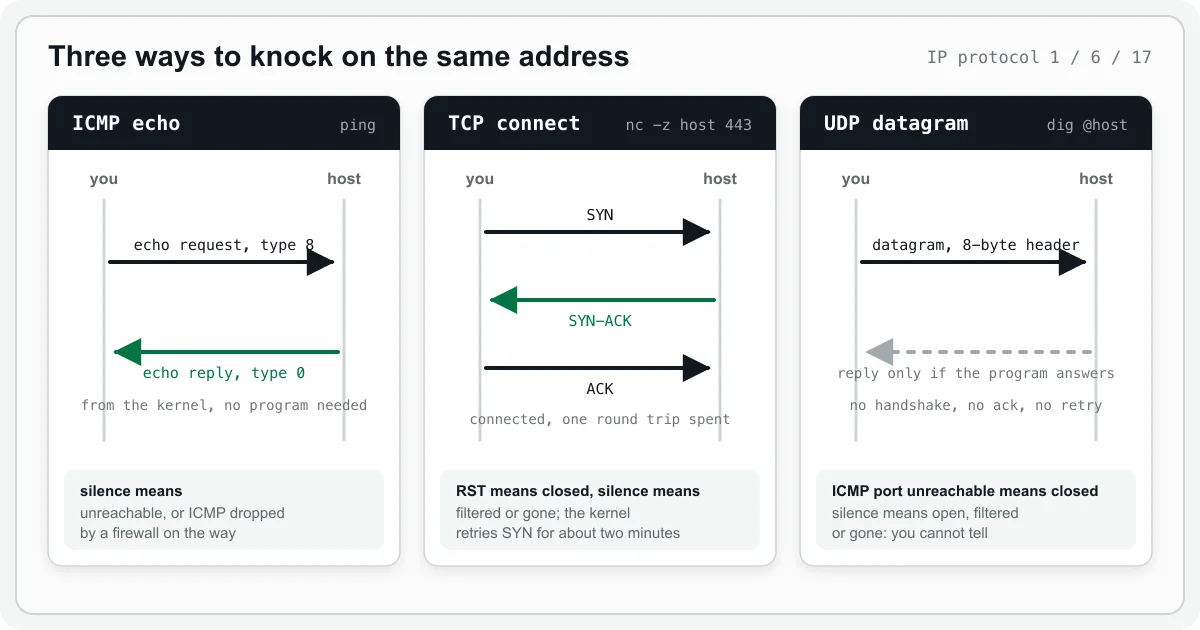
ICMP, TCP and UDP all travel inside IP packets, but they ask different questions. ICMP echo (ping) asks "does this address answer at all?" and needs no port. TCP asks "is a program listening on this port?" and gets a clear yes, a clear no, or silence. UDP asks nothing by itself: you only learn something if the program on the other side chooses to reply. A closed port answers differently on each one, and that difference is most of what a network check can and cannot tell you.
One address, three ways to knock
Every packet on the internet is an IP packet. IP knows how to move a packet from one address to another and nothing else. One byte in the IP header says what is inside, and IANA keeps the list: ICMP is protocol 1, TCP is protocol 6, UDP is protocol 17. The three are siblings: same addresses, same routers, and a different promise about what happens once the packet arrives.
| ICMP | TCP | UDP | |
|---|---|---|---|
| Specification | RFC 792 (1981), RFC 4443 for IPv6 | RFC 9293 (2022) | RFC 768 (1980) |
| IP protocol number | 1 (58 for ICMPv6) | 6 | 17 |
| Ports | none | source and destination | source and destination |
| Handshake | none | three packets before any data | none |
| Delivery guarantee | none | ordered, complete, retransmitted | none |
| Header | 8 bytes for an echo | 20 bytes minimum | 8 bytes |
| Typical users | ping, traceroute, error reports | HTTP/1.1 and HTTP/2, TLS, SSH, SQL, SMTP | DNS, NTP, QUIC and HTTP/3, video, games |
ICMP: the network talking about itself
ICMP is not a transport. RFC 792 says it plainly: ICMP "is actually an integral part of IP, and must be implemented by every IP module." It exists so that routers and hosts can report on delivery: this destination is unreachable, that packet ran out of hops. ICMP messages have a type and a code but no ports, because nothing sits on top of ICMP waiting for them. The IP stack consumes them itself.
The one ICMP message everybody has typed is the echo. ping sends an echo request (type 8, or 128 in ICMPv6) and the far host's kernel sends back an echo reply (type 0, or 129). No program had to be running. RFC 1122, the host requirements standard, makes it a rule: "Every host MUST implement an ICMP Echo server function that receives Echo Requests and sends corresponding Echo Replies."
$ ping -c 1 uptimepage.dev
PING uptimepage.dev (204.168.246.94): 56 data bytes
64 bytes from 204.168.246.94: icmp_seq=0 ttl=50 time=96.069 ms
A reply proves two things: the address belongs to a machine that is switched on, and packets can travel there and back. It also gives you the round-trip time for free.
That is all a ping proves. It says nothing about whether a web server, a database or anything else is running, and a host can answer every ping while every service on it is dead.
Two things about ICMP surprise people. The first is that no reply does not mean down. Firewalls drop ICMP all the time. On AWS a fresh security group blocks it, and the documentation says so: "To ping your instance, you must add one of the following inbound ICMP rules." Before you rely on ping for a host, confirm the host answers a ping at all.
The second is that sending ICMP needs privilege. A raw socket needs CAP_NET_RAW. Linux has an unprivileged alternative, the ICMP datagram socket, but the kernel documentation says the default ping_group_range is "1 0", "meaning, that nobody (not even root) may create ping sockets." Docker opens that range in every container that gets its own network namespace, which is why ping works there without anyone thinking about it; a container on --network host inherits the host's setting instead. I learned the limits of that the slow way: the same probe binary that pinged fine in Docker could not open an ICMP socket at all on a Firecracker microVM, until I gave it CAP_NET_RAW.
TCP: a promise before the first byte
TCP is a connection. Before either side sends a byte of data, the two ends run the three-way handshake: SYN, SYN-ACK, ACK. RFC 9293, which replaced the 1981 specification in 2022, calls it "the procedure used to establish a connection." It costs one round trip, and that round trip pays for every promise TCP makes afterwards: bytes arrive in order, lost segments are sent again, the receiver is not flooded (flow control), and the network is not flooded (congestion control). To the program it looks like a stream. You write bytes on one side and read the same bytes, in the same order, on the other.
This is what HTTP/1.1, HTTP/2, TLS, SSH, PostgreSQL, MySQL, SMTP and most of what you deploy run on.
The handshake is also a good probe, because a SYN gets one of three answers:
- SYN-ACK. A program is listening. The connect succeeds.
- RST. Nothing is listening. RFC 9293 says that if the connection does not exist, "a reset is sent in response to any incoming segment except another reset." Your connect fails at once with "connection refused".
- Nothing. A firewall dropped the SYN, or the host is gone. The kernel keeps retrying. On Linux the default
tcp_syn_retriesis 6, and the kernel documentation puts the final timeout for an active connection attempt at 131 seconds.
Here are all three from my laptop. The last one has a three second limit; without it macOS waits 75 seconds.
$ nc -zv uptimepage.dev 443
Connection to uptimepage.dev port 443 [tcp/https] succeeded!

$ nc -zv 127.0.0.1 9
nc: connectx to 127.0.0.1 port 9 (tcp) failed: Connection refused

$ nc -zv -G 3 uptimepage.dev 8443
nc: connectx to uptimepage.dev port 8443 (tcp) failed: Operation timed out
Nmap's documentation gives these states the names everyone uses: open, closed and filtered.
What a successful handshake proves: a process accepted a connection on that port. Not that it is healthy. A database that accepts connections and then rejects every query still passes. That is why a TCP check belongs on things that have no HTTP surface (SSH, SMTP, a database port) and an HTTP check belongs on things that do.
UDP: a message, nothing more
UDP is the smallest transport there is. RFC 768 fits on three pages. It adds a source port, a destination port, a length and a checksum to an IP packet, 8 bytes in total, and stops. The RFC says: "The protocol is transaction oriented, and delivery and duplicate protection are not guaranteed." There is no handshake, no acknowledgement, no ordering and no retransmission, and no congestion control either. RFC 8085 opens by saying UDP "has no inherent congestion control mechanisms" and then spends more than fifty pages telling application designers how to add their own.
Why anyone uses it: latency and control. A DNS lookup is one packet out and one packet back, no handshake. RFC 1035 capped a DNS answer over UDP at 512 bytes. EDNS(0) (RFC 6891) later let a client advertise a bigger buffer, so most answers fit in one datagram today; one that still does not fit is cut short with the TC bit set, and the client asks again over TCP (RFC 7766). NTP, most game traffic and real-time video use UDP because a late packet is worth less than the next one, so waiting for a retransmission is the wrong trade. And QUIC, the transport under HTTP/3, is built entirely on UDP. RFC 9000 states that "QUIC packets are carried in UDP datagrams" and gives the reason as "to better facilitate deployment in existing systems and networks". In practice that means QUIC does its own handshake, loss recovery and congestion control in the application, and can change them without waiting for every operating system to update its TCP stack.
$ dig @1.1.1.1 uptimepage.dev A +noall +answer +stats
; <<>> DiG 9.10.6 <<>> @1.1.1.1 uptimepage.dev A +noall +answer +stats
; (1 server found)
;; global options: +cmd
uptimepage.dev.		3600	IN	A	204.168.246.94
;; Query time: 125 msec
;; SERVER: 1.1.1.1#53(1.1.1.1)
;; WHEN: Wed Sep 02 11:40:44 EEST 2026
;; MSG SIZE  rcvd: 59
One datagram out, one datagram back carrying a 59-byte answer (67 bytes with the UDP header), and no handshake before it. Over TCP the same lookup costs two round trips, one for the handshake and one for the query, which is why DNS defaults to UDP.
Now the probing problem. Send a UDP datagram to a port and what comes back?
If nothing listens there, the host's IP stack should answer with an ICMP error. RFC 1122 again: "If a datagram arrives addressed to a UDP port for which there is no pending LISTEN call, UDP SHOULD send an ICMP Port Unreachable message." So "closed" is detectable, and it is ICMP that detects it.
If something listens, you get whatever that program chooses to send. A DNS server sends an answer. A syslog receiver sends nothing, ever. So silence means open, or filtered, or dead, and Nmap has a state for this, open|filtered. Its documentation explains: "This occurs for scan types in which open ports give no response."
The consequence is that a generic "UDP port check" does not exist. To check a UDP service you have to speak its protocol: send a real DNS query and read the answer, send a real NTP request and check the timestamp. This is why monitoring tools have a DNS check and a TCP check but rarely a UDP check.
The same closed door, three answers
| Situation | ICMP echo | TCP SYN | UDP datagram |
|---|---|---|---|
| Service up | echo reply | SYN-ACK | the program's reply, or nothing |
| Port closed, host up | echo reply (ICMP has no ports) | RST, "connection refused" | ICMP port unreachable |
| Firewall drops the packet | silence | silence, retried for about two minutes | silence |
| Host gone | silence, or an unreachable error from the last router | silence, or that same ICMP error surfacing as "no route to host" | silence, or that same ICMP error |
Read the table by columns. TCP is the only one where "closed" and "filtered" look different on their own, UDP borrows ICMP to say "closed", and ICMP cannot see ports at all. Silence is the ambiguous answer on all three, which is why no check should conclude "down" from one silent probe sent from one place. Two or three consecutive misses, seen from more than one network, is the honest bar. I wrote about that in how to stop false uptime alerts.
What this means for a monitor
I build Uptimepage, and its check types map onto these questions, so this is how the theory turns into a config.
- Ping sends one ICMP echo with a 32-byte payload, the size Windows
pinguses (Unixpingsends 56, as the transcript above shows), so middleboxes see ordinary diagnostic traffic. It tries the first IPv4 and the first IPv6 address of the host and splits the timeout between them. Silence for the whole budget is down, because an echo has no way to refuse. Use it for routers, gateways and hosts that expose no service. - TCP runs the handshake and closes the connection. Accepted is up, refused is down, and a timeout is recorded as an error with the time it took. An error counts as a failed check for alerting exactly like down, so a firewalled port still opens an incident once the confirmation threshold is met. Use it for databases, brokers, SSH and mail, where "a process accepted the connection" is the most you can assert from outside.
- DNS sends a real query and checks the answer's content, so it is the UDP check for the one UDP service almost everyone depends on. It can point at a specific resolver, which matters when you want that server's view and not your cache's.
- HTTP is a TCP handshake, then TLS, then a request, and it records the time spent in each phase: DNS, connect, TLS and time to first byte. The connect phase is the handshake from this article, measured inside a bigger check.
Pick the check that asks the question you care about, and remember what each one cannot see. There is a fuller version of that decision in the monitor types documentation, and a story-shaped version in the mystery of the "down" website.
Common questions
Is ICMP a transport protocol like TCP and UDP?
No. ICMP is a control protocol that belongs to IP itself, and RFC 792 says every IP module must implement it. It has no ports and carries no application data. It reports on delivery: a destination is unreachable, a packet ran out of hops, and the echo pair that ping uses.
Why does ping work while my website is down?
Because ping only proves that the host's IP stack answers and that packets can travel there and back. The kernel sends the echo reply, so no web server, database or other program has to be running. A host can answer every ping while every service on it is dead.
Why does a closed TCP port fail at once but a firewalled one hangs?
A closed port sends back a TCP reset, so the connect fails immediately with connection refused. A firewall that drops the SYN sends nothing, and the kernel keeps retrying. On Linux the default is six retries, and the kernel documentation puts the final timeout at 131 seconds.
Can I check a UDP port the way I check a TCP port?
No, because an open UDP port sends nothing back unless the program behind it chooses to answer. A closed port is detectable, since the host should reply with an ICMP port unreachable message, but open and filtered both look like silence. To check a UDP service you have to speak its protocol, for example send a real DNS query.
If UDP is unreliable, why does HTTP/3 use it?
UDP itself gives no delivery guarantee, and QUIC adds its own on top. QUIC runs inside UDP datagrams and does its own handshake, retransmission and congestion control in the application, which lets it evolve without waiting for every operating system to update its TCP stack.
Sources
- IETF, RFC 792: Internet Control Message Protocol, September 1981.
- IETF, RFC 4443: ICMPv6 for the Internet Protocol Version 6, March 2006.
- IETF, RFC 768: User Datagram Protocol, August 1980.
- IETF, RFC 9293: Transmission Control Protocol, August 2022.
- IETF, RFC 1122: Requirements for Internet Hosts, Communication Layers, October 1989. Sections 3.2.2.6 and 4.1.3.1.
- IETF, RFC 8085: UDP Usage Guidelines, March 2017.
- IETF, RFC 1035: Domain Names, Implementation and Specification, November 1987. Section 4.2.1.
- IETF, RFC 6891: Extension Mechanisms for DNS (EDNS(0)), April 2013.
- IETF, RFC 7766: DNS Transport over TCP, Implementation Requirements, March 2016.
- IETF, RFC 9000: QUIC, a UDP-Based Multiplexed and Secure Transport, May 2021.
- IANA, Assigned Internet Protocol Numbers.
- Linux kernel, IP sysctl documentation,
tcp_syn_retriesandping_group_range. - Nmap, Port scanning basics, the six port states.
- Amazon Web Services, Security group rules for different use cases, rules for ping/ICMP.