2026-10-15
How to announce scheduled maintenance on your status page
- status-page
- incidents
- reliability
- monitoring
TL;DR
Announce planned work early enough for its impact, with a time zone and a list of the affected services. Show it on the status page while it runs, and post a short update when something changes. When it ends, keep it in the page history, so a reader can see weeks later that a slow Tuesday was planned work and not an outage.
Planned work still needs a public record
Maintenance is downtime you choose. You pick the hour and you know the risk, so you can tell people before anything happens. That makes it easier to handle than an outage, and also easier to get wrong without noticing.
Say you upgrade the database on Tuesday night and checkout is slow for fifteen minutes. Nobody announced it. A customer opens your status page, sees everything green, and writes to support. From where they sit, the page was wrong.
The second gap shows up later. The work went well, the window ended, and the status page dropped it. Three weeks later a customer compares their error logs with your history. Their traffic dipped on Tuesday night and your page shows nothing, so the planned work now looks like an outage you kept quiet. A page that forgets a window the moment it ends loses the explanation right when someone needs it.
Before: announce the window
Choose the lead time from the impact
There is no single rule for how early to announce. Give more notice when the impact is bigger, and if you announce more than a week ahead, remind people closer to the day.
These are my defaults:
| Impact | Notice |
|---|---|
| Customers will not notice | A day or two |
| A service gets slower or stops for minutes | About a week |
| Customers temporarily lose access to something they build on, such as the API | Up to two weeks, plus a reminder the day before |
For a two-week notice, send the reminder through a channel your customers already read, such as your newsletter or a banner in your app.
Write the announcement
A good announcement says what changes, when, which services are affected, what customers will notice, and what they should do. Answer the last one even when nothing is needed. A plain "you do not need to do anything" saves your support team a lot of tickets.
Database upgrade on Tuesday, 20 October
We are moving our main database to new hardware on Tuesday, 20 October, from 22:00 to 23:00 UTC. Checkout and the API may be slow for up to 15 minutes during this time. No data is lost and you do not need to do anything. We will post here when the work starts and when it ends.
Always write the time zone. Without one, "22:00" is a different hour for a reader in Lisbon, in Berlin and in New York.
If you want a starting point, the incident update generator writes scheduled, in progress and completed maintenance messages from a few fields. It runs in your browser and stores nothing you type.
During: show it on the page
When the window starts, the status page should change without anyone touching it. The affected services show "Maintenance" and the page says that work is in progress, so a reader who arrives because checkout is slow sees the reason at the top.
If the work takes longer than planned, edit the end time before the old one passes and say why in one line. Readers accept a delay they were told about much more easily than a window that quietly runs late.
Database upgrade: running late
The data copy is slower than planned. We now expect to finish by 23:30 UTC. Checkout still works, but it may be slow until then.
If the work finishes early, end the window when it is done. The page stops showing maintenance, and the record shows how long the work really took.
Keep the checks running
Pausing monitoring during maintenance is a common shortcut. It does stop the alerts, but it stops the record too: if the upgrade breaks something you did not expect, nothing sees it, and if you forget to resume the monitors, you go days without alerts.
A maintenance window handles this better. The checks keep running, and alerts for the monitors in the window are held until it ends. If the problem is still there when it ends, the alert goes out then. Monitors outside the window alert you as normal, so a problem the work causes somewhere else still reaches you.
After: keep it in the history
When the window ends, post one short final message and leave the window on the page.
Database upgrade: completed
The upgrade finished at 23:24 UTC. Checkout and the API are back to normal speed.
From then on the entry answers questions for you. A customer who saw slow checkout last week finds the reason in seconds, and someone checking your reliability before they buy sees that you plan your work and announce it. Your support team can link to the entry instead of explaining it again.
If your page has a daily history strip or an uptime figure, show planned work there as maintenance. If it counts as downtime, a team that announces its work looks worse than one that does the same work quietly. A failure outside the window should still count, though.
How it works in Uptimepage
In Uptimepage, all of this starts from a maintenance window.
Schedule the window
Pick the monitors, the start and the end, and whether to hold alerts. Subscribers get an email or a webhook when you save it, and the page shows the window with a countdown. Each reader sees the times in their own zone, with the zone named.
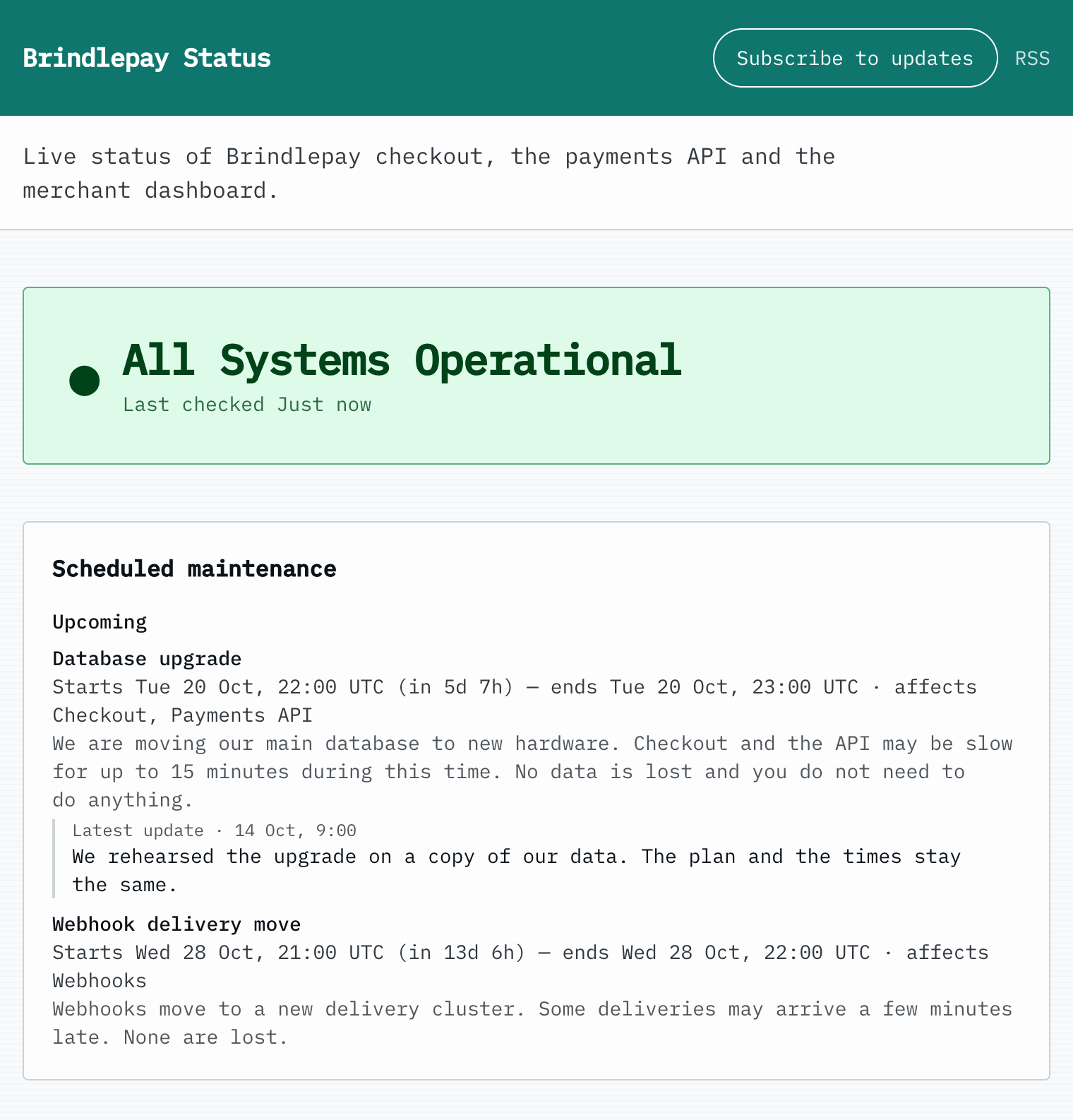
The newest update sits under the window. Here it tells readers the plan has not changed.
Post updates as the work goes
Each window has its own page in the app, where you post updates: a reminder before it starts, a line when it runs late, how it went once it ends. Each one shows on the status page and goes to subscribers.
While it runs
The affected components show "Maintenance" and, if nothing else is wrong, the banner says "Maintenance in progress", with the newest update under the window. You can end a window early, and the page then uses the real end time.
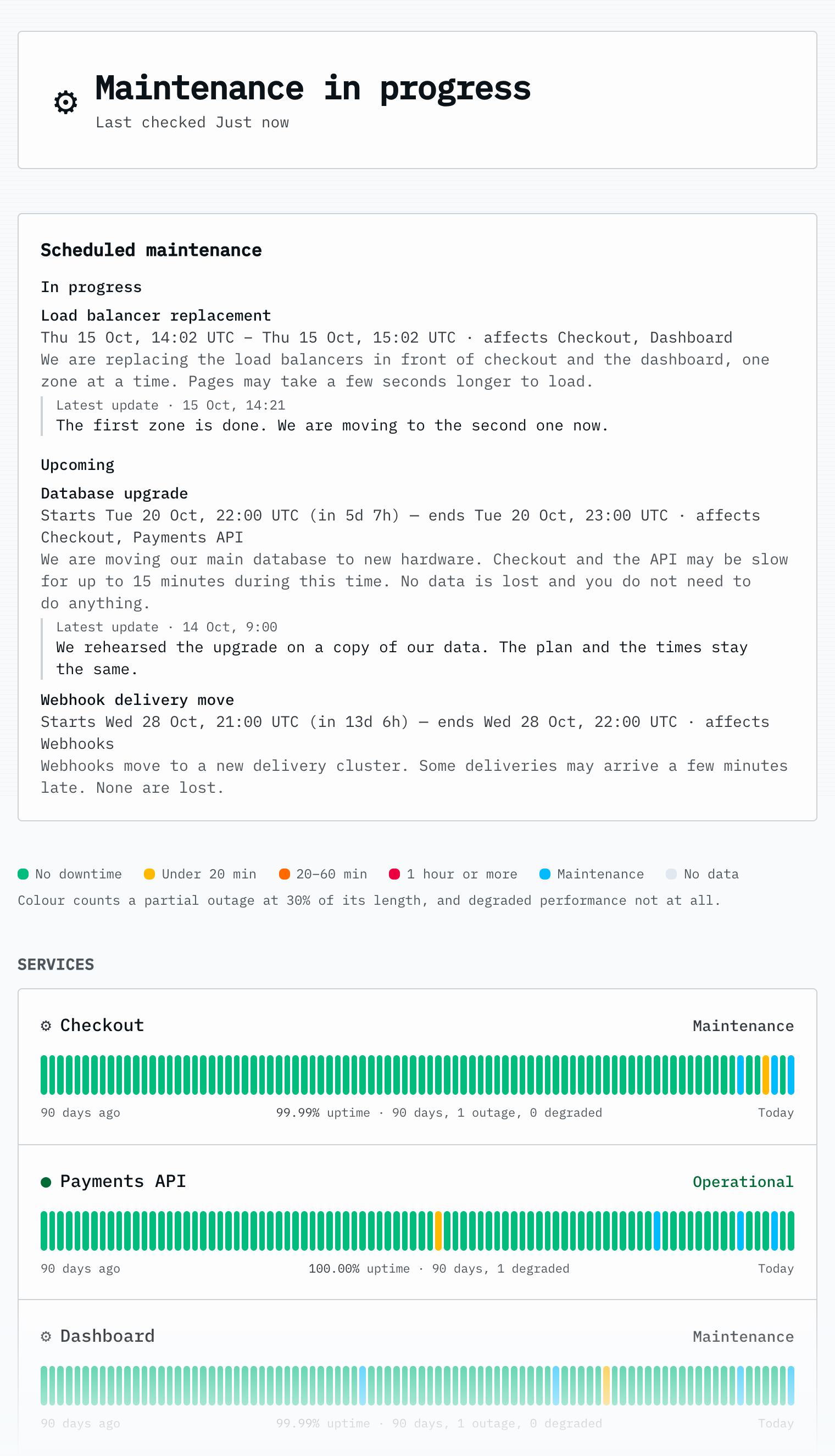
Checkout and Dashboard are in the window, so they show Maintenance. Payments API is not, so it stays Operational.
After it ends
Subscribers get a completed notice, and the page keeps the window. Each day with maintenance shows in blue on the 90-day strip, and time inside the window does not count against the uptime figure. An outage outside the window on the same day still counts.
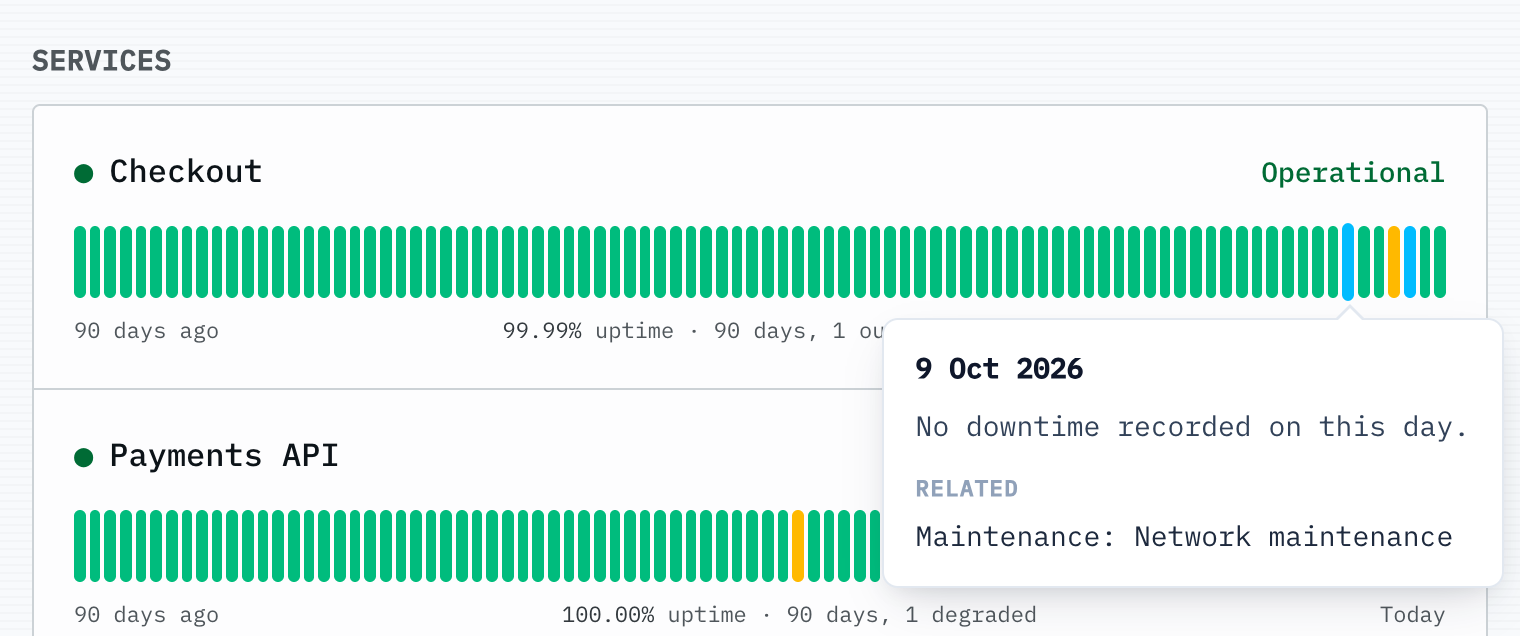
Hover over a blue day, or tap it, to see the window and open it in the history.
The window also moves to the history section, next to past incidents. A reader opens its row to read the description and every update.
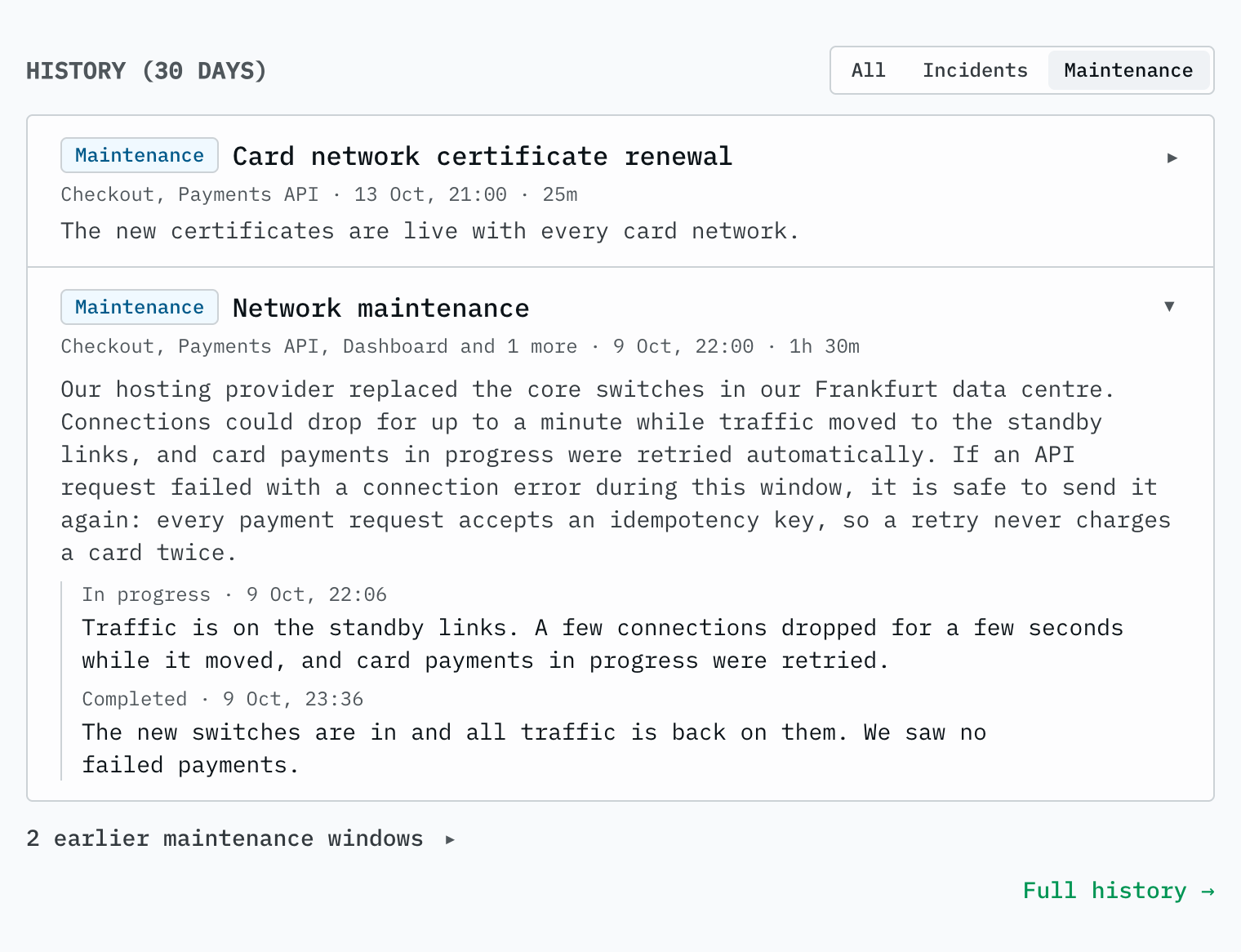
An open row shows the description, then every update with the phase it was posted in.
The public status page docs have the exact rules: how far ahead windows show, how far back the history and the archive go, and what the page keeps when a monitor leaves it. They cover the public API too, if you want to build your own page. You can schedule a window and post its updates from the REST API as well, or ask an AI assistant to do it through the Uptimepage MCP server.
Common mistakes
- Announcing on the day. A notice an hour before the work reaches almost nobody, because the people who would plan around it have already planned their day.
- Writing times without a time zone. Readers in other countries have to guess, and some of them guess wrong.
- Pausing monitors instead of scheduling a window. You lose the record, readers see nothing on the page, and turning the alerts back on depends on someone remembering.
- Letting the window disappear when it ends. A week later it cannot explain anything.
For the incident side of the page, see how to write incident status updates. For keeping the whole page honest, see a status page you cannot fake.
Common questions
How far in advance should I announce scheduled maintenance?
Give more notice when the impact is bigger. A day or two is enough for work your customers will not notice. Give about a week for work that slows down or stops a service, and up to two weeks when customers temporarily lose access to something they build on, such as your API.
What should a maintenance announcement include?
Say what will change, when the work starts and ends, which services are affected, and what customers will notice. Write the times with a time zone, and say what customers should do, even when the answer is nothing.
Should I pause monitoring during maintenance?
No, schedule a maintenance window instead. The checks keep running, and alerts for those monitors are held until the window ends. An alert goes out then only if the problem is still there. You keep a record of the work, readers see it on the page, and you cannot forget to turn the alerts back on.
Should finished maintenance stay on the status page?
Yes. A finished window explains a slow day in your history, and it shows readers that you plan your work and tell them about it.