2026-07-23
How I mapped my codebase for humans and AI agents
- ai-agents
- llm
- codebase
- documentation
TL;DR. I asked an AI model to turn my codebase into three things: a one-page summary for me, a JSON file for the next AI agent, and an interactive map you can click. It worked well, but only after one boring step: check every number against the code. The model got the shape right and several counts wrong. You can see the live map.
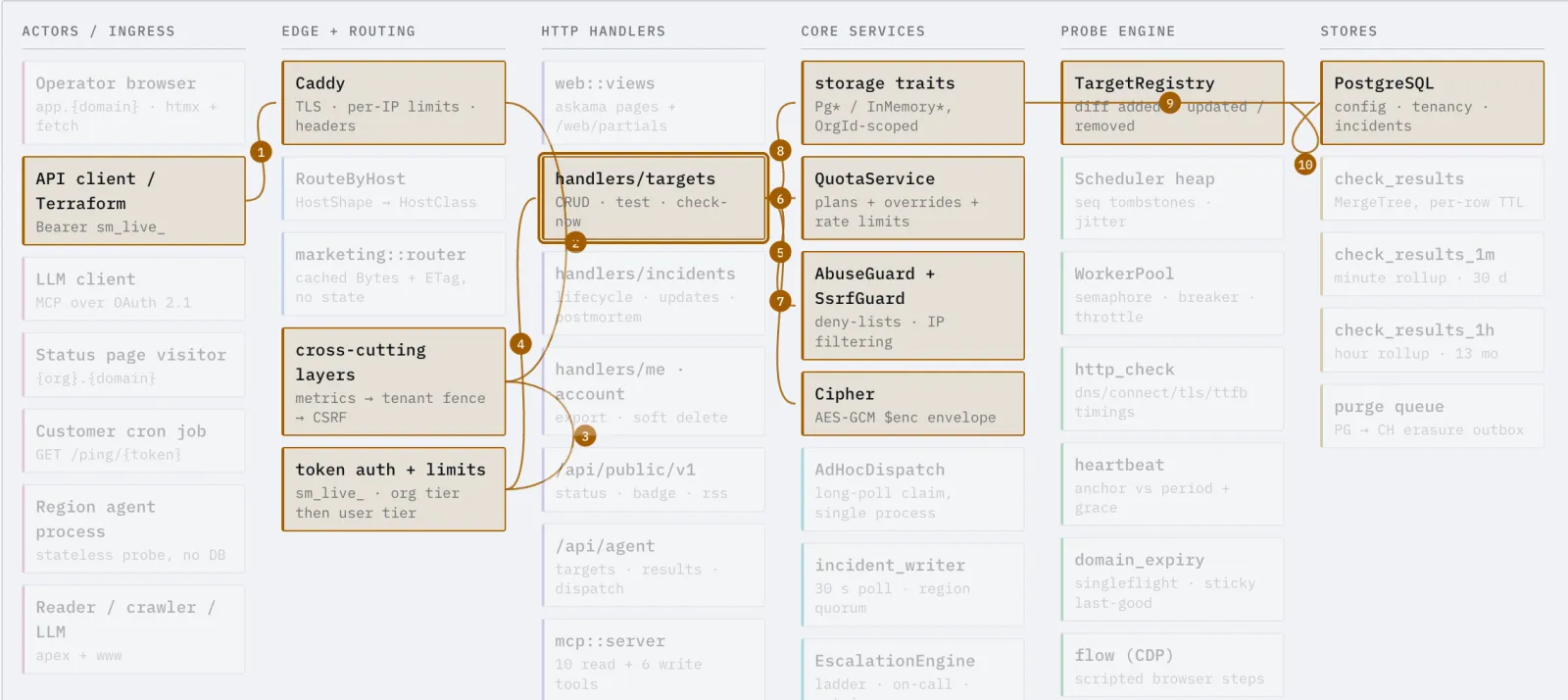
The interactive map itself, with one flow lit up across the system. Open the live version and click any flow.
A big codebase does not fit in your head. Mine is about 146,000 lines of Rust across 31 modules. When you open a project that size, the first hour is just finding where things are.
AI agents have the same problem. Every time an agent starts a task, it reads many files to learn how the system fits together. It does this from zero, every time. That is slow, and it costs money.
So I tried something. I asked an AI model to read the whole codebase and write three things. One for me, one for the next agent, and one for anyone.
The three files
The first file is a one-page summary for a human. It lists the rules that must always hold, the main parts and what each one does, the path a request takes, and the traps that waste time. It is the page I wish existed on my first day.
The second file is a JSON map for the next AI agent. It is not written to be pretty. It lists the invariants with the file or test that enforces each one, a short recipe for each common task, the known traps, and the key files. When the next agent starts a task, it reads this first and skips an hour of searching.
The third file is an interactive map for everyone. It shows the parts as boxes in columns. You pick a flow, like "a scheduled check" or "an agent login", and the path lights up across the boxes with numbered steps. It is live here: the architecture map.
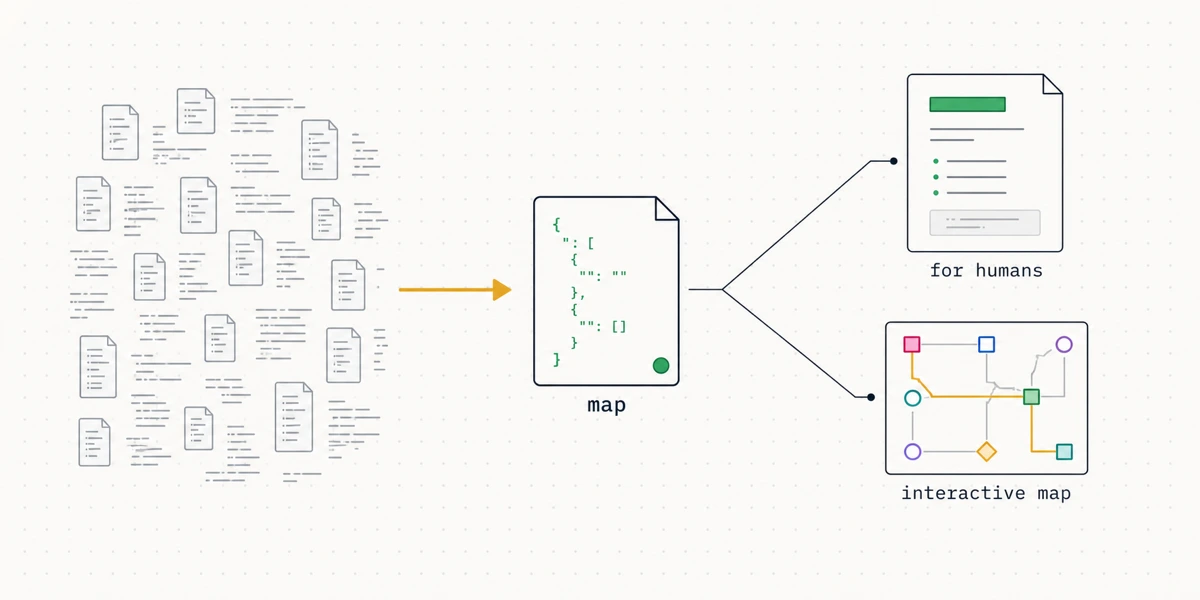
The three files. The JSON map is the source of truth, and the human page and the interactive map are both built from it.
One file is the source of truth
The JSON map holds every fact. The other two files are only views of it. Build the map first, and the human page and the interactive map cannot disagree.
The method, not one magic prompt
There is no single prompt that does this well. The result comes from four steps, in order.
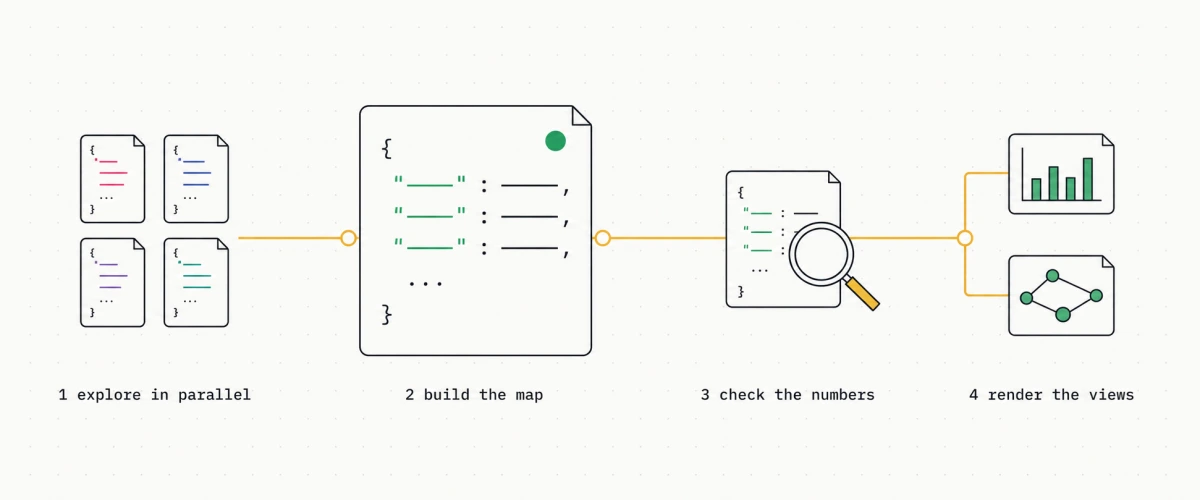
The four steps. Everything hangs off step two, the map.
First, explore in parallel. One agent cannot read 146,000 lines in one go. I let several agents read different parts at the same time, then joined their notes. This is faster and it covers more.
Second, build the machine map first. The JSON for the agent is the source of truth. The human page and the interactive map are only views of it. So I build the JSON first and put every fact in one place.
Third, check every number in that map, before you build anything else. This is the step people skip, and it is the most important one. You verify once, at the source, so a wrong count cannot spread into the other files.
Fourth, render the views from the map. The human page and the interactive map both come from the same JSON, so they cannot disagree. Each view has one clear reader: the page is for a new engineer, and the map is for a visitor who has never seen the code.
The numbers the AI got wrong
The model was good at structure. It found the parts, the flows, and the rules. But it guessed numbers, and some guesses were wrong.
It said there were 13 alert channels. The real number is 14.
It said there were about 80 error codes. The real number is 155.
It said there were 19 blog posts. The real number is 18.
None of these are small. If you publish them, you look careless, and the next agent trusts a wrong map. I only found them because I checked each count against the source code.
Check the numbers, at the source
An AI model is strong at shape and words. It is weak at exact numbers. Verify every count in the map, once, before you build anything from it. Then check the ones that matter yourself.
The prompts
Here are the three prompts, in the order I ran them. Build the map first, check it, then make the views. Change the details for your own project, and keep the "verify against the source" line in the first one.
For the machine map, build this first:
Read my whole codebase. Write one JSON file for the next AI agent that will add a feature. Include the invariants, and for each one name the file or test that enforces it. Add a short recipe for each common task: the goal, then the files to touch in order. Add the known traps and the key files. Keep every path exact. Verify every count against the source code. Do not invent numbers. This file is data for a machine, not prose.
For the human summary, built from the map:
From that verified JSON, write one self-contained HTML page that explains the system to a new engineer. Include the rules that must always hold, the main parts and what each does, the path a request takes, the path data takes, and the traps that waste time. Rank the parts by size. Do not add any number that is not already in the JSON.
For the interactive map, built from the same map:
From the same JSON, build one self-contained interactive HTML page. Show the parts as boxes in columns. Show each flow as a numbered path that lights up across the boxes when I click it. Keep all styles and scripts in the page. No build step.
Common questions
Can an AI model read a whole codebase?
Not all at once, and not perfectly. A large codebase does not fit in one prompt. The trick is to let several agents read different parts at the same time, then join their notes. The model is good at finding structure and explaining it in plain words. It is weak at exact numbers, so you still have to check those against the code.
Why write a file for an AI agent and not just for people?
Every time an AI agent starts work on your code, it reads a lot of files to learn how things fit together. That costs time and money, and it starts from zero each time. A short map file gives the next agent the rules, the common tasks, and the traps up front, so it can start work instead of re-learning the whole system.
Can I trust the numbers an AI gives about my code?
No. Treat every count as a guess until you check it. In my run the model said 13 alert channels when the real number was 14, and about 80 error codes when the real number was 155. It gets the shape right and the numbers wrong. Ask it to verify each number against the source, and then check the important ones yourself.
What are the three files you made?
A one-page HTML summary for me, a JSON file for the next AI agent, and an interactive flow map that anyone can click. The map is public. You can open it and trace how a request moves through the system.
Why this is worth doing
The human page saved me time the next week. The map helps me explain the system in one screen. And the JSON is the part I did not expect to like. The next agent that touches this code reads a map first, so it starts from step one instead of step zero.
The next agent starts from step one, not step zero
A map file hands the next AI agent the rules, the tasks, and the traps up front. It reads one small file instead of re-reading the whole codebase every time.
Key takeaways
- Build the machine map (JSON) first. The human page and the interactive map are only views of it, so they cannot drift.
- An AI model is strong at structure and weak at numbers. Verify every count at the source before you build anything from it.
- Write a map file for the next AI agent, so it starts from step one instead of re-reading the whole codebase.
- Explore in parallel. Several agents reading different parts cover more than one agent reading everything.
- Give each file one clear reader. It keeps the writing simple.
- The model got real counts wrong, like 13 channels when the real number was 14. Do not publish a number you did not check.
If you want to see the output, open the interactive map. The whole project is open source, so you can read the real code behind every box.