2026-08-01 · Updated 2026-10-01
Your E2E login test never runs in production
- qa
- e2e
- synthetic-monitoring
- testing
- playwright
TL;DR
Your login test is correct. It runs in CI, against staging, at merge time, where none of the real faults can happen. Point the same journey at production on a schedule and you catch the four that lock customers out. What will actually stop you is two-factor, magic links and bot walls, and all three have a way around them.
Every suite has a login test. It fills two fields, clicks submit, and checks the page behind the login. It is usually the oldest test in the repo and the one everybody trusts. It passes.
Then support gets a queue of people who cannot get in.
Where your suite actually runs
On a pull request. On a merge. Maybe at night. Against staging, or against a container the pipeline started thirty seconds ago and filled with fixtures.
Production at three in the morning on a Sunday, with the real login provider, the real CDN, the real bot vendor and a secret that expired at midnight, is somewhere your suite has never been. Not rarely. Never.
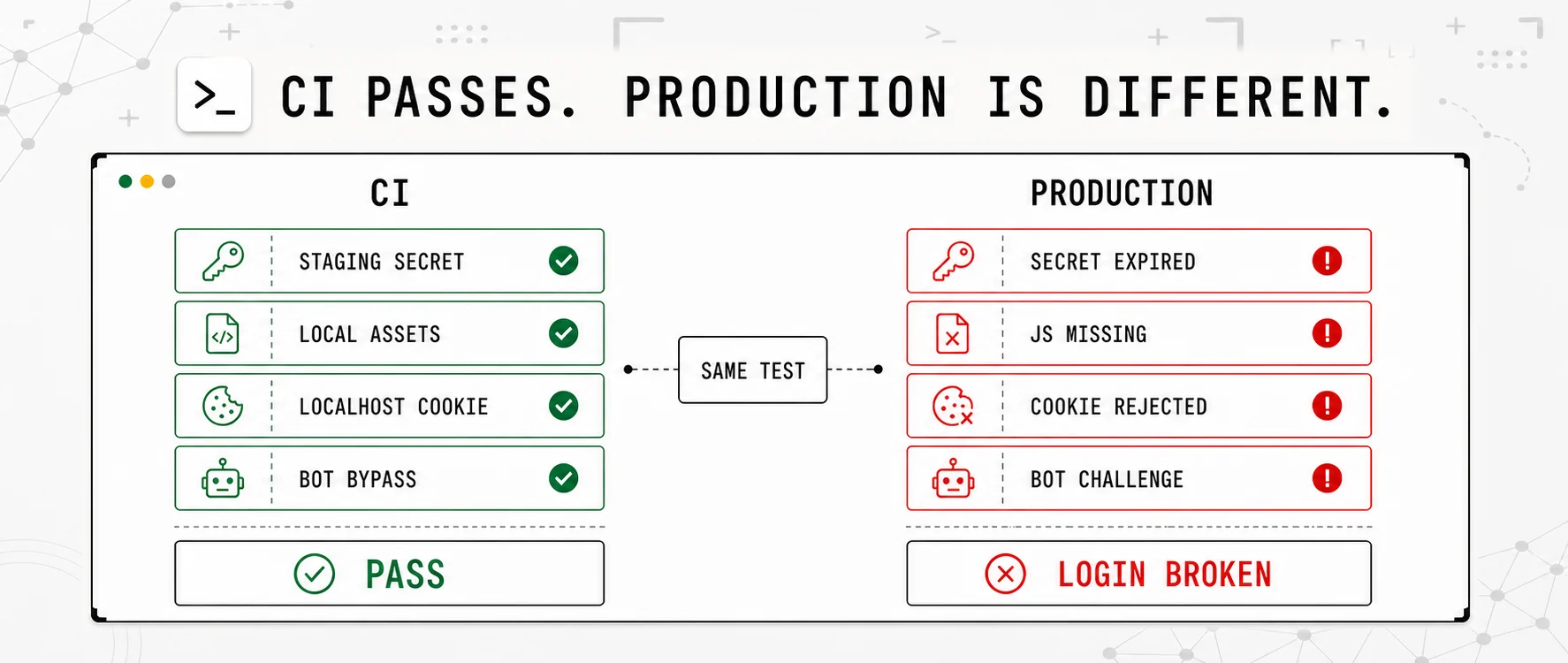
The same test passes. Only one environment contains the failure.
The faults CI cannot copy
Take the four ways a login breaks while every check stays green and try to write a CI test for each one.
| The fault | Why your pipeline cannot have it |
|---|---|
| The OAuth secret expired | Staging has its own app, its own secret, its own end date. Yours is not the one that ran out. |
| A JavaScript file never reached the CDN | Your runner builds the bundle or serves it locally. There is no CDN there to lose a file. |
| The session cookie stopped being set | Domain, SameSite and Secure do almost nothing on localhost, over http, on one host. The setting that breaks production does nothing in CI. |
| A bot rule started blocking real users | CI traffic goes past the vendor or is allowed through on purpose. And a challenge is selective, so the suite never meets the rule that is eating your corporate customers. |
The pattern is the same in all four. The test is right. The place it is right about is not the place your customers are in.
Pick a fault below and watch both runs at once. The left column is your suite in CI, and it goes green under every one of them. Only production moves.
The same test, on a different clock
Running the same journey against production on a schedule has a name, synthetic monitoring, and there is less to it than the name suggests. It is the test you already have, with two changes. It runs forever instead of once per merge, and a failure wakes someone up instead of turning a pipeline red.
| Your login test in CI | The same journey as a check | |
|---|---|---|
| Runs | when someone opens a pull request | every five to fifteen minutes, forever |
| Against | staging, or a container built a minute ago | production, with the real secrets, CDN and bot rules |
| When it fails | the pipeline turns red | someone gets a message |
| Catches | code that broke the login | everything else that broke the login |
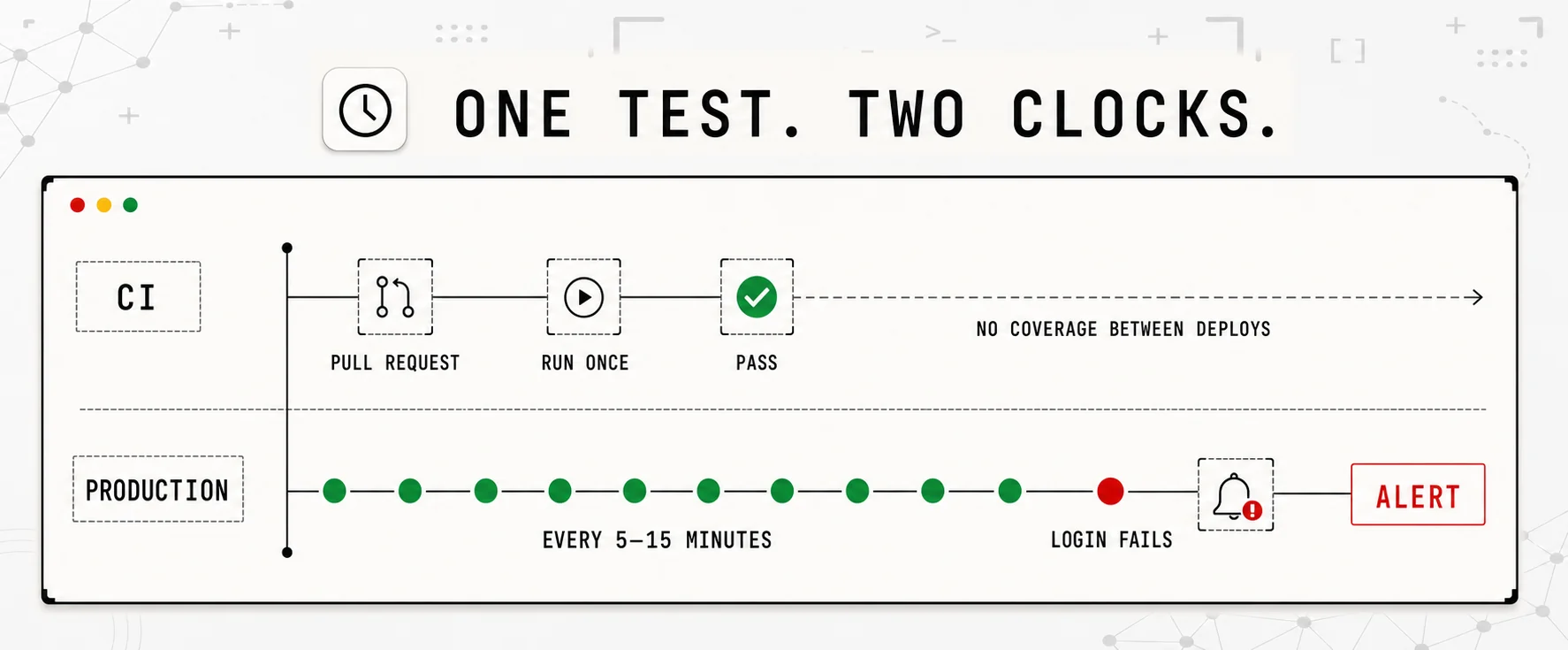
CI protects the deploy. Monitoring protects the hours after it.
Google's SRE book has a name for this too, black-box monitoring, which it defines as testing externally visible behaviour as a user would see it. Your suite already does that. It just does it somewhere safe.
A flow is a list of steps, not a script, and the list is short on purpose: open a page, fill a field, click, wait for a selector, check text, check the URL.
This is not code to copy. Every app uses different fields, buttons and URLs. You add the journey in the flow builder, or import a Chrome recording, then tell the monitor what a successful login must look like:
| What you configure | Example | Why it is there |
|---|---|---|
| Start at the login page | https://app.example.com/login | begin outside an existing session |
| Fill the email field | #email with monitor@example.com | prove the field exists and accepts a value |
| Fill the password field | #password with the login_password secret | keep the credential out of the monitor configuration |
| Click the sign-in button | button[type=submit] | prove the control exists and submits the form |
| Check the destination URL | it contains /dashboard | prove authentication succeeded and the session survived the redirect |
| Check the signed-in page | it contains Signed in as | prove the page behind the login rendered |
Check two things and stop there. The URL contains the path behind the login, and one string that only the signed-in page shows. Do not check a greeting with the user's name or the time of day in it, or your own copywriter will wake you up at midnight. And do not skip the checks. Without one, a login that quietly refuses you passes forever, which is why a flow without an assertion is refused instead of saved.
What will actually stop you on day one
Three things, in the order teams meet them. All three have a way through.
Two-factor on the account. No step reads a code out of an authenticator app, and a code saved in a secret is dead almost at once: RFC 6238 sets the default time step for those codes at thirty seconds. You have two options, and the second is better than it sounds. Turn the second factor off for this one account in your login provider, which is normal for service accounts, or stop the flow at the code screen and check that the prompt appeared. Reaching that screen already proves the password was accepted, the provider answered, and a session started. That is three of the four faults in the table above.
Getting to the code screen is where logins break. Typing the code is not.
So a flow that stops at the second factor is not a compromise you have to apologise for. It is most of the value, and you can set it up this afternoon.
A magic link or a code by email. Same shape, same answer. The browser cannot open a mailbox, so check that the "check your email" page appeared after the address was sent. That covers the part that breaks when your mail provider starts refusing or a limit changes. Our own login is a magic link, so we live with this too.
A CAPTCHA or bot wall in front of the form. If the wall challenges your check, you are no longer watching your login. You are watching the vendor. Let the login path or that one account through the rule, the same way you already let CI through. If your policy will not allow that, put a plain HTTP check on an endpoint behind the login instead, and accept that you are covering less.
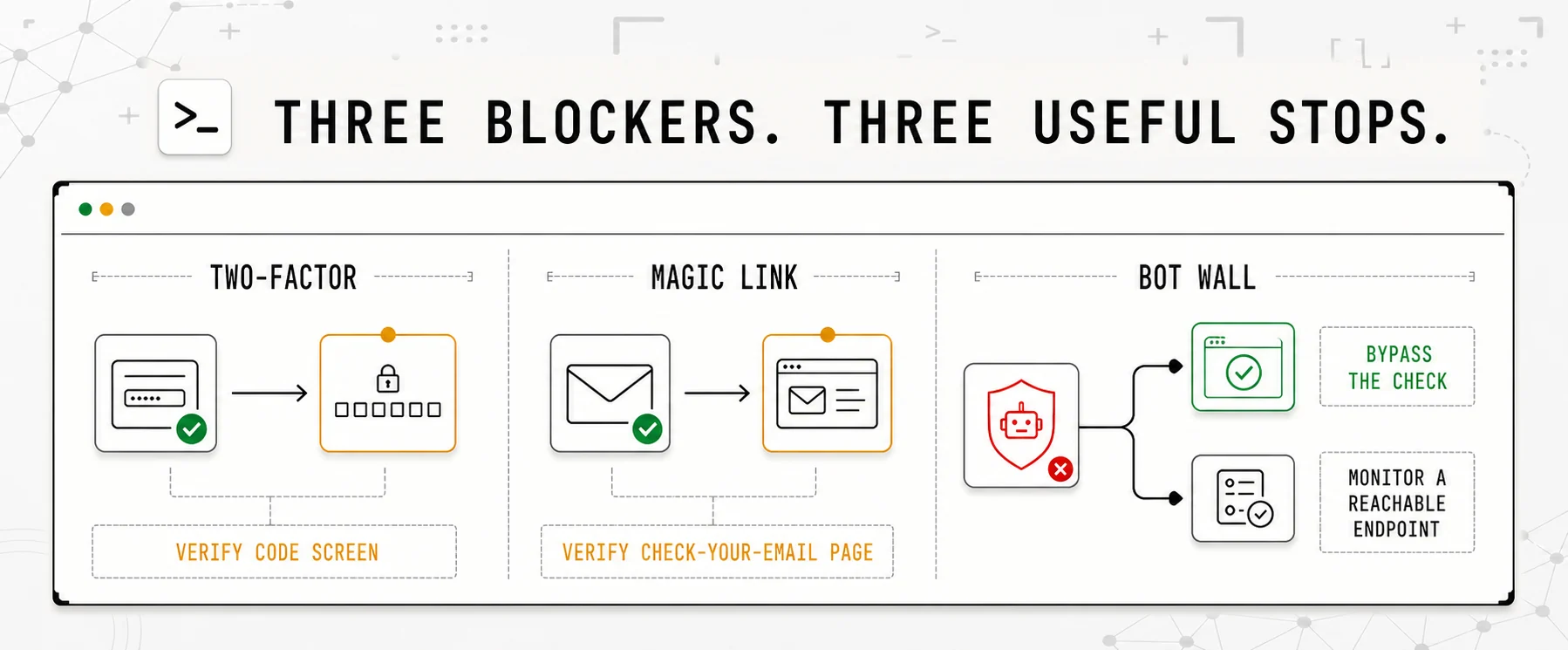
A useful check stops at the last proof it can reach reliably.
Selectors that do not rot
The Chrome Recorder writes several candidate selectors for each step: CSS, ARIA, text, XPath and pierce. The import keeps the plain CSS one. It cannot replay the aria/, text/ or pierce/ candidates at all. An xpath/ candidate converts only when every part of it is something the import can translate, so ids and indexes come across and anything cleverer does not. And when the only selector recorded is a bare tag, the import flags the row and asks you to make it specific, because button matches the first button on the page, which is usually the cookie banner.
So the difference between a clean import and a lost afternoon is decided before you press record.
Do this first
Give the email field, the password field and the submit button a stable hook. Chrome already prefers
data-testid,data-test,data-qaanddata-cywhen it writes a CSS selector, so use one of those names and the recording comes out short and survives the next redesign. The same three hooks pay for themselves in your own suite.
Two limits are worth checking at the same time, because they decide whether the login can be watched at all. Every step finds its element with document.querySelector on the top level document, so a login widget inside an iframe, or built on a shadow root, is invisible to all of them. And there is no key press step, so a form you submit with Enter needs a real click on the submit button instead. The import tells you about both, instead of letting you find out three days later.
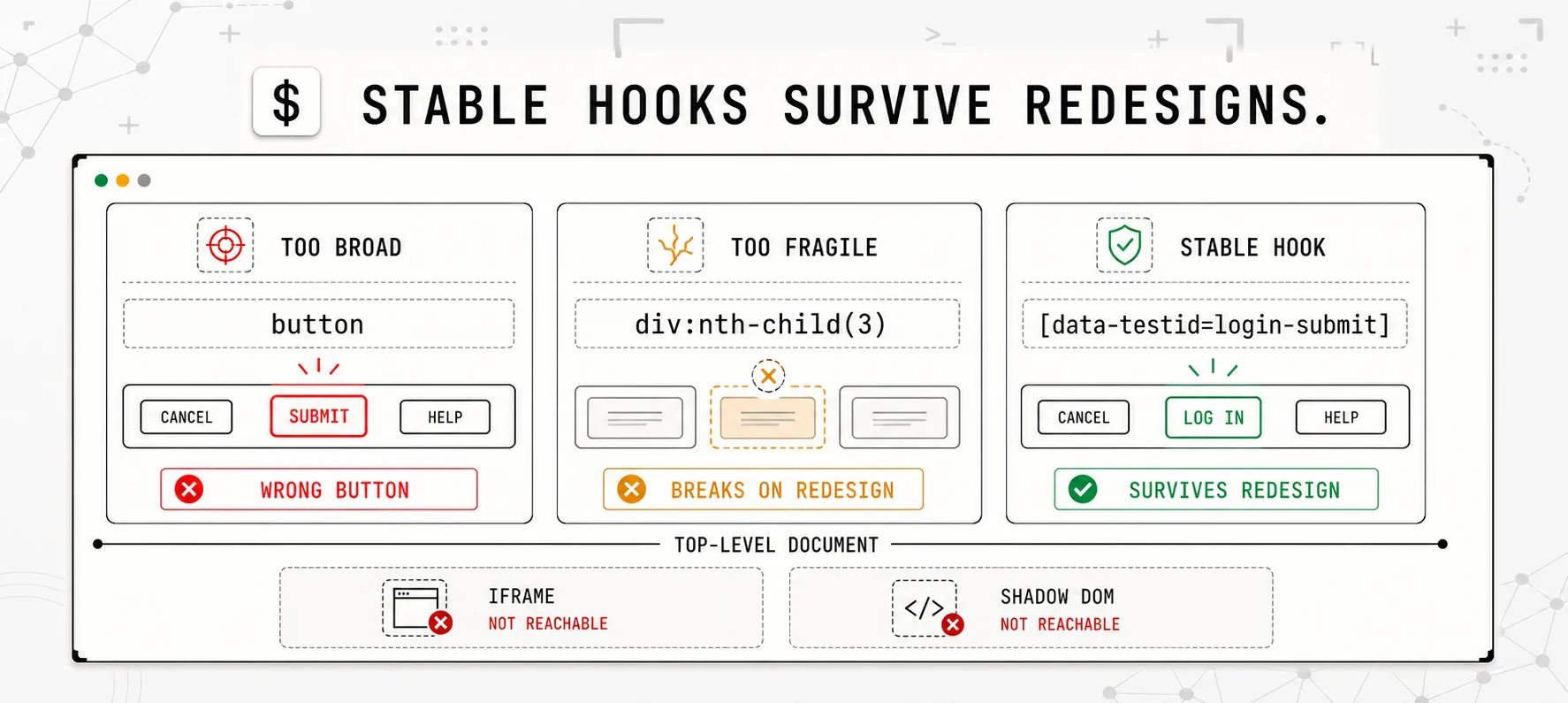
Name the control once. Keep the check through every redesign.
But will it not be flaky?
This is the right question, and it is why most teams never point an end to end test at production. A suite that fails once a week for no reason is annoying in CI. Wired to a pager, it is a reason to turn the pager off, and a pager somebody turned off is worse than no pager at all.
One failing run wakes nobody. A region has to fail twice in a row before it counts as failing, so a single bad minute lands in the run history instead of on someone's phone at four in the morning.
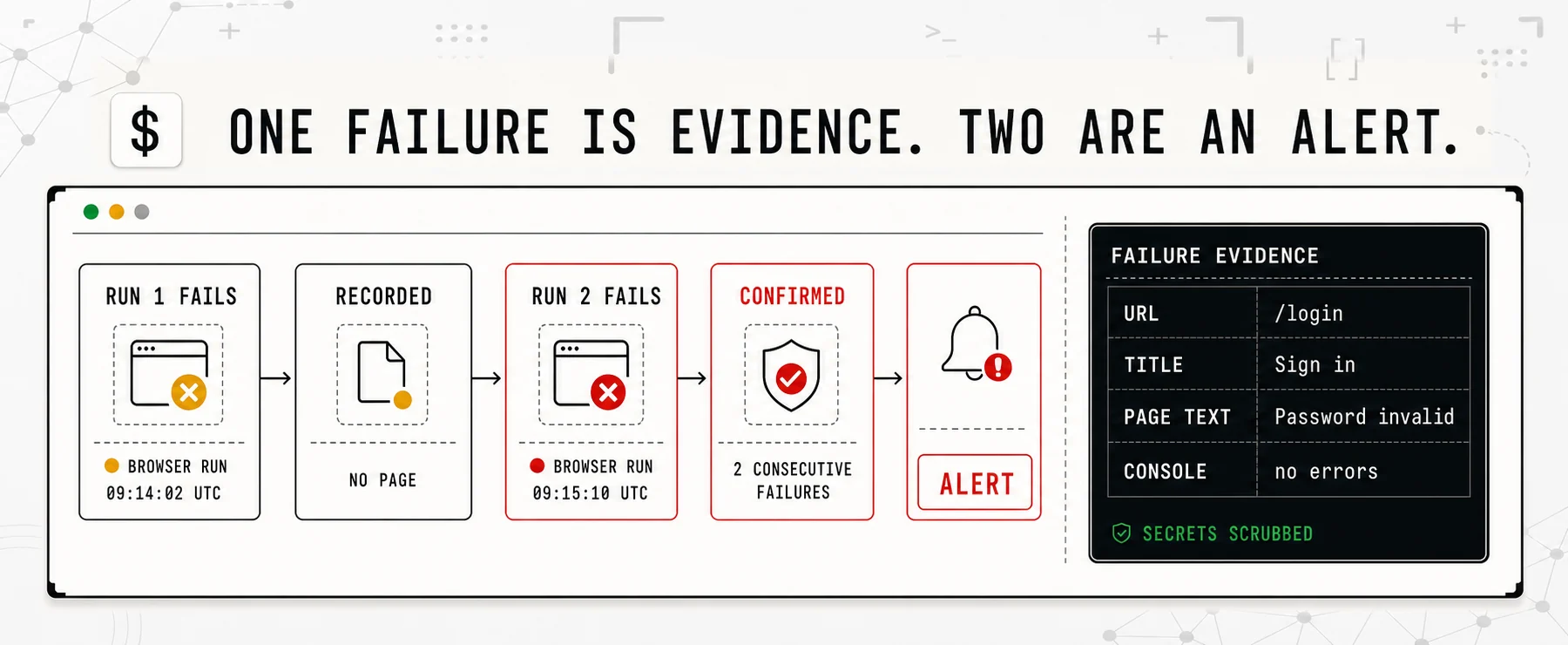
Noise stays in history. Repeated failure reaches a human.
Wait for what you need, never sleep and hope. Steps that wait have their own timeout, under a budget for the whole run, and a failed run tells you which of the two ran out. When a field renders late, put a wait_for in front of the fill. A longer interval will not help, and a longer step timeout will not either, because fill and click do not wait at all.
Read the evidence before you change anything. A failed run keeps the URL the browser ended on, the page title, the visible text, and whatever the page logged to the console, with your secrets removed. Most of the time the URL answers it. Still on /login after a submit means the password never took.
There is a fourth thing, and it is the one people keep the check for later. Every step is timed on every run, so you see the slow drift as well as the break. A step that took 200 milliseconds and now takes four seconds will start timing out in a fortnight. That is your login provider getting slower, or a redirect chain that grew, weeks before it costs you a customer.
The account it logs in with
Make a separate one, with the fewest rights that still finish the journey, and keep the password in a secret the monitor points at rather than in its config. This account logs in every few minutes, forever, from a machine nobody watches. It should be able to do nothing else, and it should never be a real customer or an admin.
Two habits that save you later. Keep the journey read only, because logging in is safe to repeat a hundred times a day and finishing a checkout is not, unless those orders have somewhere to go. And when the password changes, change the secret and nothing else, because the monitor holds a pointer and not a copy.
Where it stops
A flow drives a whole browser per run, so it is the most expensive check there is. Five minutes is the floor, and the number of them is capped by plan. That is the right shape, not a limit to work around. Watch the one journey that decides whether you have a business today, the login or the checkout, and keep cheap HTTP checks on everything else.
Your suite still does what it always did. This covers the hours between deploys, which is most of them.
Ours is browser login monitoring, with flow monitors on the Founding, Pro and Team plans. The monitor types reference has the mechanics, including importing a recording and a straight list of what a flow cannot do.
Common questions
Is this just my end to end tests running in production?
Running the same journey against production on a schedule has a name, synthetic monitoring, and there is less to it than the name suggests. It is the test you already have, with two changes. It runs forever instead of once per merge, and a failure wakes someone up instead of turning a pipeline red.
How do I monitor a login that needs two-factor?
You have two options, and the second is better than it sounds. Turn the second factor off for this one account in your login provider, which is normal for service accounts, or stop the flow at the code screen and check that the prompt appeared. Reaching that screen already proves the password was accepted, the provider answered, and a session started.
Will a browser check page me for flaky failures?
One failing run wakes nobody. A region has to fail twice in a row before it counts as failing, so a single bad minute lands in the run history instead of on someone's phone at four in the morning. Steps that wait have their own timeout, and every run records each step with its duration.
Can I reuse my Playwright or Cypress test?
A flow is a list of steps, not a script, and the list is short on purpose: open a page, fill a field, click, wait for a selector, check text, check the URL. So you do not port the code. You either write those steps out, which takes a couple of minutes for a login, or you record the journey in Chrome and import it.
Does this replace my end to end suite?
Your suite still does what it always did. It covers a lot of ground against a build before that build ships. This covers one journey in production, again and again, after it ships. They fail for different reasons, and that is the point of running both.