2026-08-01 · Updated 2026-10-01
Your login page returns 200. Nobody can sign in.
- monitoring
- login
- trust
- uptime
TL;DR
A 200 means the server sent the login page. It does not mean the form works, the cookie is set, or the password check still runs. Those break on their own. When they do, your monitoring stays green and your customers stay locked out.
The worst outage is not the one where your site is down. It is the one where your site is up, your status page says all systems operational, and nobody can log in.
You find out about that one from Twitter.
What a 200 really proves
An HTTP check asks for the login page and reads the status line. If the line says 200, the check passes. That is all it does.
So it proves three things. The server answered. The process was alive. The page was sent. That is useful, and it is also the whole list.
Everything a person does next happens where the check never goes. Typing in the fields. Pressing the button. The request that carries the password. The reply that sets the session cookie. The jump to the page behind the login. Your monitor saw none of it, because it left as soon as it read the status line.
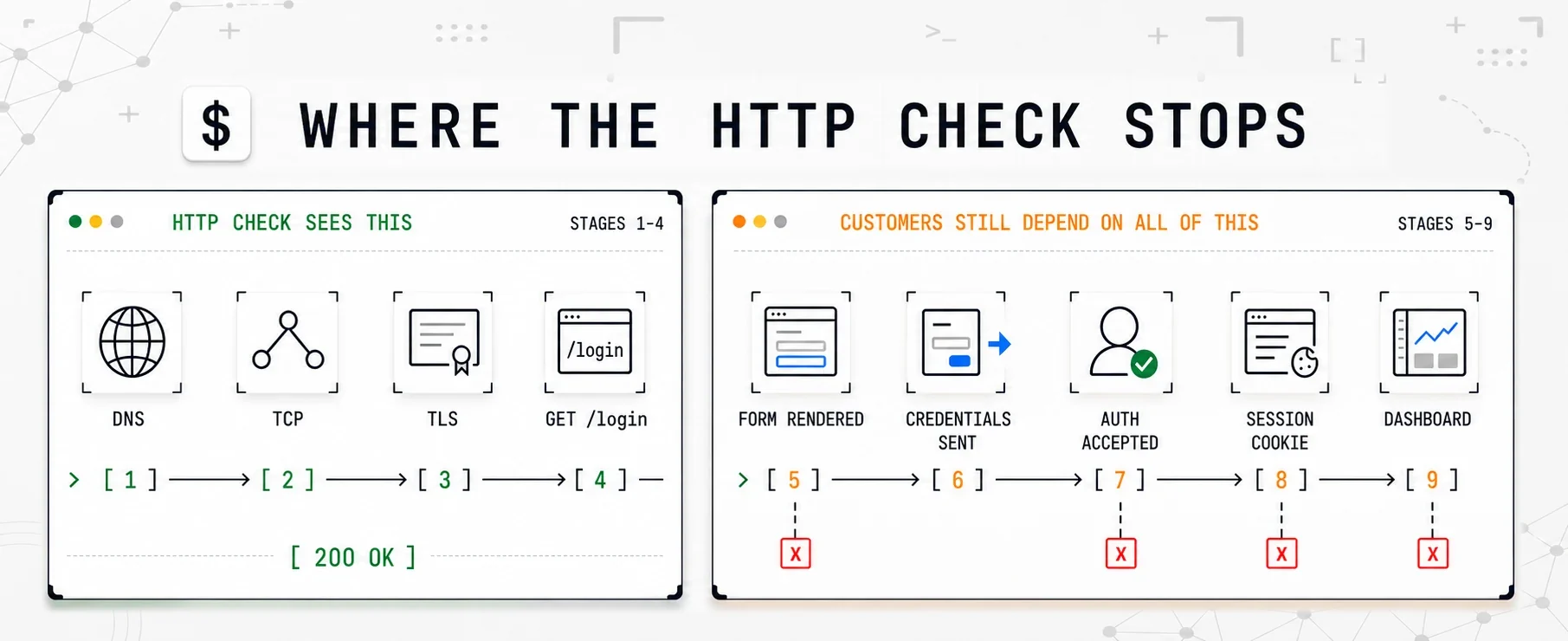
The HTTP check reaches 200 OK. The customer journey has only just begun.
Four ways a login breaks while every check stays green
None of these are rare. Each one is a normal Tuesday.
The OAuth secret expires. You set up Google or Microsoft login two years ago. The secret had an end date and nobody wrote it in a calendar. Microsoft caps a client secret at two years and recommends under one, so this is not bad luck. It is a date you were always going to reach. On the day it passes, the login page still loads, the button still looks right, and every attempt comes back with a general error. Your HTTP check never talks to the login provider, so it sees nothing at all.
A JavaScript file stops loading. You deploy. File names carry a hash. One file never reaches the CDN, or it arrives with the wrong content type. The HTML is fine, so the page returns 200. But that file is what draws the form, so the fields never appear. A header, a footer, and empty space in the middle. This one is cruel, because it often hits only cold caches or one browser. On your laptop it looks fine.
The session cookie stops being set. Someone changes a cookie attribute like SameSite or Domain, or the app moves to a new subdomain, or a proxy starts stripping a header. The password is accepted, the server is happy, the redirect happens. Then the app sends the user straight back to the login page, because it cannot find the session. From outside it looks like a wrong password. Support gets a queue of people who swear they typed it correctly. They did.
To investigate that return trip, follow how to debug a redirect loop. Compare the browser's cookies and redirect chain with a stateless request before changing the login rules.
Bot protection starts blocking real users. You turn on a rule, or your vendor changes a default. Now some visitors get a challenge page where the form should be. Checking your browser, and then nothing. Cloudflare says most visitors pass a challenge without interaction, and that is the trap: a challenge is selective, so your check, which asks for one page from one place every few minutes, may never be challenged at all. Your uptime graph stays flat and green. The people locked out are usually on a company VPN or an older browser, which often means your biggest customers.
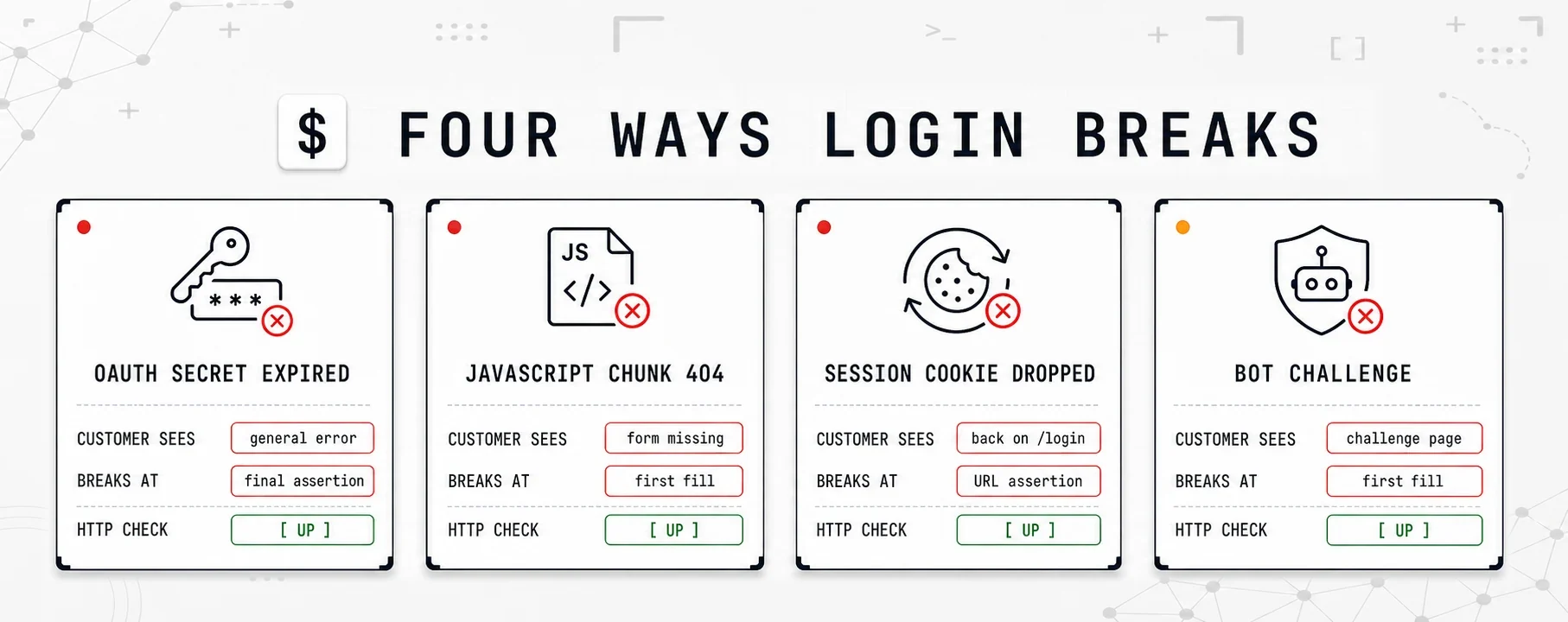
Four different failures, one identical dashboard: green.
Which one is it? The support tickets will tell you
Keep this table. When the tickets start and your dashboard is green, the words customers use point at one of the four faster than a log search will.
| What you hear | Usually this | Where to look first |
|---|---|---|
| "It says my password is wrong. It is not." Several people, all sure. | The session cookie is not being set, so the app sends them back to the login page. | Log in yourself and watch the cookies. Password accepted, then back on /login, is the tell. |
| It started at an exact time, out of hours, with no deploy near it. | Something with an end date ran out: the OAuth secret, a signing key, a certificate. | The login provider's own log. Your app log will only show a general error. |
| "Nothing happens when I click." It works on your machine. | A missing or broken JavaScript file, so the form never rendered. | A private window with an empty cache, on another network. Then the browser console. |
| Only some customers, and they are the corporate ones. | A bot rule or WAF is challenging real traffic. | Your bot vendor's dashboard for that path, not your app logs. |
None of this tells you when it started. That part is expensive, and that part is the job of the check.
Pick a fault below and watch it run. The panel on the left is the HTTP check, and it never changes. It resolves, connects, does the handshake, reads a status line and says up. Only the flow moves.
What the four have in common
The server is healthy, the page is sent, and the status code is 200. There is no request you can send and no header you can read that separates a working login from a broken one. The only way to know is to log in.
Watch where each fault dies. The missing file and the bot wall die early, on the first fill, because the field is not on the page at all. The expired secret and the dropped cookie let every field and every click work, then die at the end, on the assertion, because the only thing wrong is where you ended up. That second pair is why a check without an assertion is worthless. Every step passes, and the user is still on the login page.
It costs you trust, not just uptime
Being down is survivable. Everyone is down sometimes, and customers forgive it more easily than teams expect, as long as you tell them.
Being up and broken is different, for two reasons.
A wrong status page is worse than no status page
Yours says everything is fine. Their screen says they cannot get into the thing they pay for. One of you is wrong, and they know who. So you are telling a customer, in public, on a page you built to be believed, that what is happening to them is not happening. Trust takes far longer to repair than a server.
The second reason is the clock. When a server dies, you know in a minute. When a login breaks quietly, the clock only starts when a customer gives up, finds your support address and writes to you. That is rarely under an hour, and at a weekend it can be a day.
Most of that cost never becomes a ticket. The people who write to you already pay you and already care. The rest just leave. The trial that could not get back in. The signup that gave up on the second try. The buyer who was comparing you with someone else on a Sunday afternoon. Nothing in your dashboard ever mentions them.
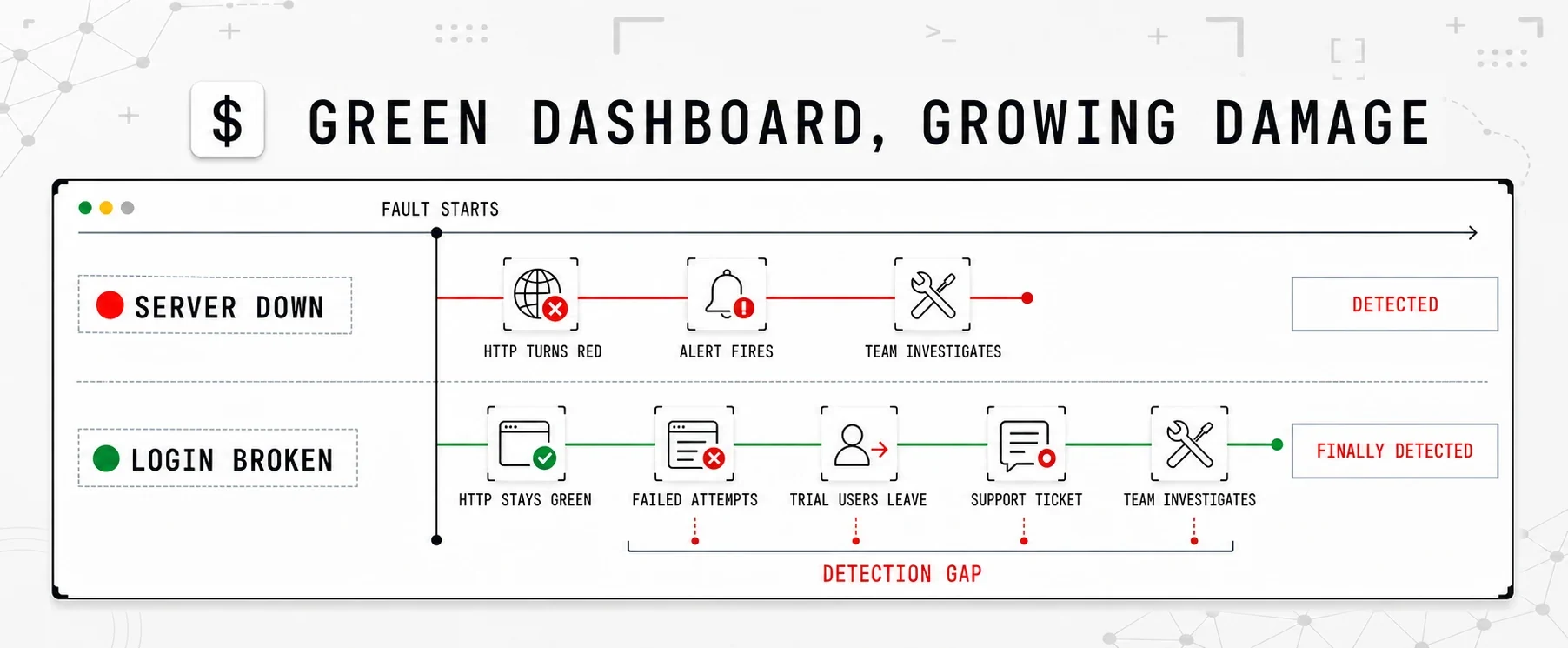
The server outage speaks first. The broken login waits for a customer to report it.
What checking the whole journey looks like
A browser flow check runs a real browser through the steps a person takes. Google's SRE book calls this black-box monitoring, or testing what a user would see.
You do not write it as code. You add the journey in the flow builder, or import a Chrome recording, and a login comes out as six lines. Start at the login page. Fill the email field. Fill the password field from a secret. Click the button. Then two checks: the URL you landed on, and one string that only the signed-in page shows. The post for test engineers sets out each line and why it is there.
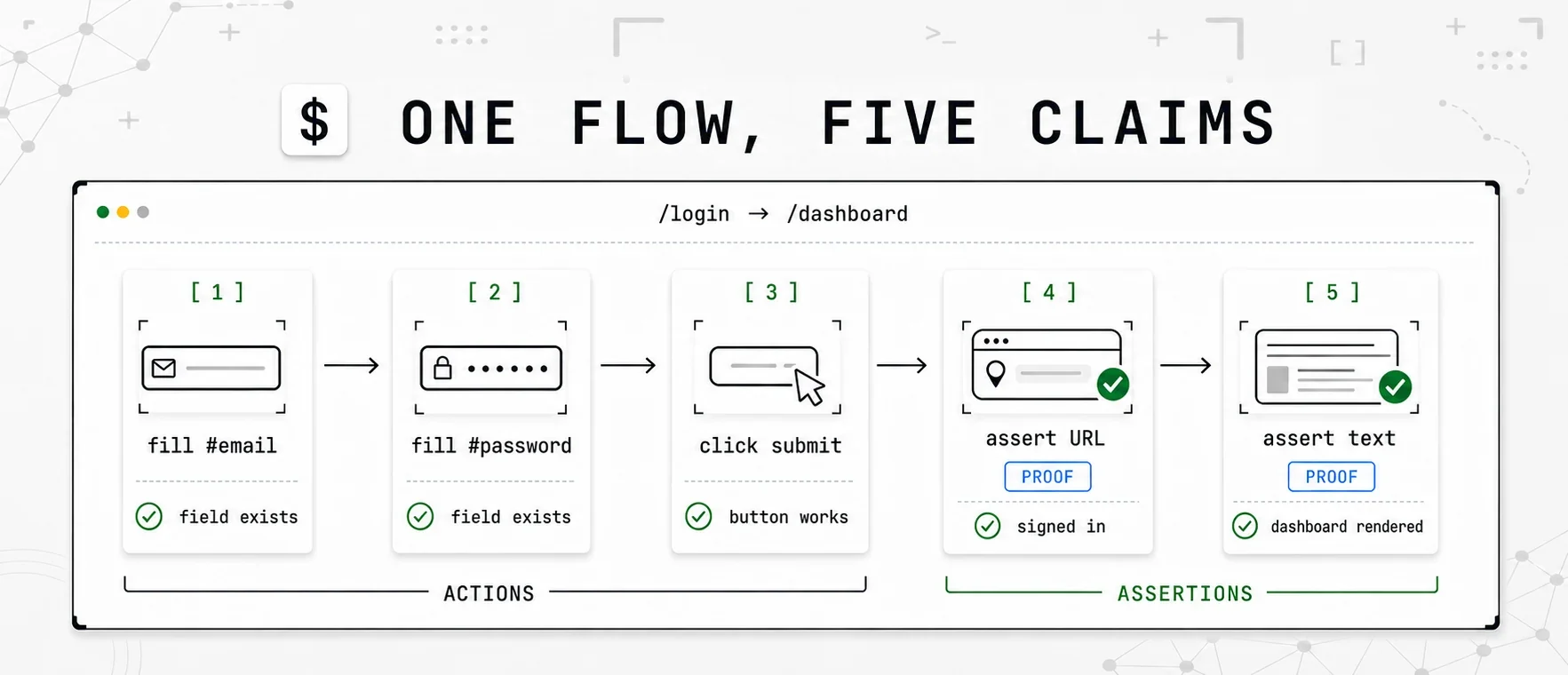
A click says the button worked. The assertions prove the login did.
The assertions are the point. Without them, the check passes as long as no step errors, so a login that quietly refuses you still looks fine. A check that cannot fail is not a check, which is why ours will not save a flow without one.
Use a separate account with the fewest rights that can still finish the journey. Keep the password in a secret that the monitor points at, not in the monitor's own config. This account logs in every few minutes, forever, from a machine nobody watches, so it should be able to do nothing else.
When a step fails, one line usually settles it: the URL the browser was on when it gave up. Still on /login after a submit means the password never took. Somewhere unexpected means a redirect changed.
The failure is not even the best part. Every step is timed. A step that used to take 200 milliseconds and now takes four seconds is a step that will start timing out soon, and you see that weeks before the first red run. A green light cannot show you that.
Two minutes, before you set anything up
Nobody logs in to their own product from outside. You have a session that never ends, on the machine that built the app, on the network it was built on. That is why this kind of fault survives so long.
So be a customer for two minutes.
The two-minute test
A private window, on your phone, on mobile data instead of the office wifi. Empty cache, a different IP, no extensions, no session. Then log in with an account that is not yours.
If it works, good. You know something you did not know this morning. If it does not, you have just found the thing your dashboard calls operational, and the four faults above are your shortlist. Either way, you will not remember to do this again on Sunday. That is the argument for automating it.
When you do not need this
A flow check is the most expensive check there is. It runs a whole browser every time. Every five to fifteen minutes is normal, not every ten seconds, and that is fine, because the failures it finds last hours rather than seconds.
If your site is a blog, docs or a brochure, skip it. An HTTP check on the page, plus certificate and domain expiry, is enough.
Add one when money or access depends on a journey with several steps. That is usually one journey per product.
| What you run | What to watch |
|---|---|
| A blog, docs, a brochure site | HTTP check on the page, plus certificate and domain expiry |
| An app people log in to | One flow on the login. Cheap HTTP checks on everything else |
| A shop | One flow on the checkout, as far as the payment step |
| An API | HTTP checks on the endpoints, and a heartbeat on the jobs behind them |
Watch that one journey, keep cheap checks on the rest, and you have covered the failure your dashboard is otherwise built to hide.
Ours is browser login monitoring. The Founding, Pro and Team plans include flow monitors, starting with one on the free Founding plan, because one journey is what most products need.
If you already have an end to end login test in CI, the next post explains why it cannot see any of these four faults. If you are still deciding what to watch at all, start with do I need an uptime monitor.
Common questions
Why does my monitor say up when customers cannot log in?
An HTTP check asks for the login page and reads the status line. If the server sends the page, the check passes. Everything after that, filling the form, sending it, getting a session, happens where the check never goes.
What is a browser flow check?
A browser flow check runs a real browser through the steps a person takes. It opens the page, fills the fields, clicks the button, and then checks that the page behind the login really appeared. If a step fails, it tells you which one, and what the page said at that moment.
How often should a login check run?
Every five to fifteen minutes is normal, not every ten seconds. A browser costs much more than an HTTP request. Watch the one journey that earns you money, and keep cheap HTTP checks on everything else.
Is it safe to give a monitor a real password?
Use a separate account with the fewest rights that can still finish the journey. Keep the password in a secret that the monitor points at, not in the monitor's own config. Never use a real customer account, and never an admin one.
Does every website need this?
If your site is a blog, docs or a brochure, skip it. An HTTP check on the page, plus certificate and domain expiry, is enough. The moment money or access depends on a journey with several steps, that journey is the thing worth watching.