2026-11-15
systemd quietly removed my container's swap limit
- docker
- systemd
- linux
- postmortem
- ops
TL;DR
Caddy, the reverse proxy in front of my service, had a 1 GiB memory cap and no swap allowance. I checked it in the kernel after the deploy:
memory.swap.maxwas 0. Four days later, an unattended libc upgrade re-executed systemd. Docker had never told systemd about the zero, so systemd wrote its own value back: unlimited. Nothing logged it. 20 hours later a traffic burst pushed Caddy to its cap, and instead of being killed in seconds it swapped for 45 minutes and stalled the whole host. The fix is one page of swap: a non-zero limit that systemd records and keeps.
02:45, the alert
I run Uptimepage, an uptime monitoring service. Its own alerts reach my phone, and one of them fired in the middle of the night:
uptimepage: host swapping
host swap-in above 4 MiB/s for 10m; working memory no longer fits and requests stall.
Find the process that grew (Caddy first) and restart it.
The text says "Caddy first" because I wrote that rule six days earlier, after Caddy had already taken the host down once. That time Caddy had grown slowly over two weeks, until the host ran out of memory and started to swap.
So I had built a cage. The compose file gave Caddy a hard limit:
mem_limit: 1g
memswap_limit: 1g
In Docker, memswap_limit is memory plus swap. When the two values are equal, the container gets zero swap. If Caddy ever reached 1 GiB again, the kernel would kill it, Docker would restart it, and the outage would last a few seconds instead of an hour.
The same deploy also started to scrape Caddy's own metrics, which caused a different surprise that morning. After the deploy I checked the kernel's own view of the container. It said exactly what I wanted:
memory.max       1073741824
memory.swap.max  0
Five days later, in the middle of the night, the host was swapping again, with the cage still in place.
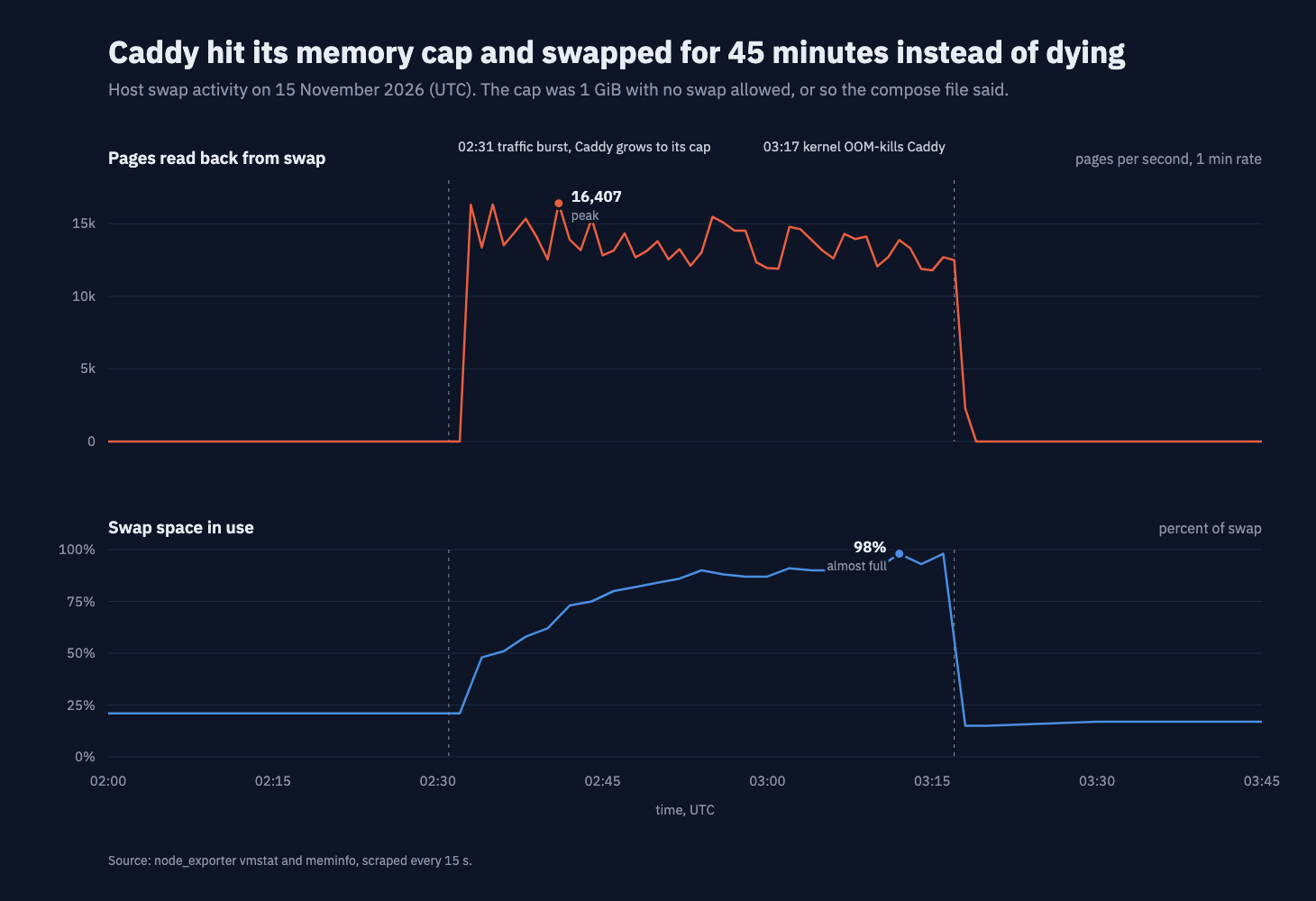
Swap reads and swap use on the host. The cage should have ended this at the first vertical line.
A cage that does not close
The first clue was the shape of the chart. A container with no swap cannot cause swap traffic like this. When it reaches its cap, the kernel first frees what it can (file cache, mostly). Then it kills the biggest process in the container. That takes seconds, not 45 minutes.
The second clue was the end. At 03:17:30 the kernel did kill Caddy, and Docker restarted it. Within a minute, swap reads fell to zero. So Caddy was the process behind the swapping, and its death fixed it. The cap was supposed to cause that death at 02:34, when Caddy first reached 1 GiB. It came 43 minutes later.
What happened in the middle was a bug in Caddy itself, triggered by a burst of scanner traffic. It is fixed upstream since Caddy 2.11.5, and I upgraded the same morning. That bug has its own post. This one is about the cage, because the cage was the part I trusted.
The kernel's confession
When the kernel kills a process for memory, it writes a report to the kernel log. It names the cgroup, prints the cgroup's memory counters and lists the processes. I found the report for 03:17:30:
caddy invoked oom-killer: gfp_mask=0x100cca(GFP_HIGHUSER_MOVABLE), order=0, oom_score_adj=0
memory: usage 1048576kB, limit 1048576kB, failcnt 22344276
swap: usage ...kB, limit 9007199254740988kB, failcnt 0
Memory cgroup out of memory: Killed process 1944039 (caddy)
The memory line is what I expected. Usage was 1048576 kB, exactly at the 1 GiB limit, and the cap had been hit more than 22 million times.
The swap line is the confession. The limit is not 0. It is 9007199254740988 kB, the largest value the kernel's page counter can hold. That is how the kernel writes "no limit". Caddy had been allowed to push as much of itself into swap as it wanted, and it had pushed out far more than the 1 GiB it was allowed to keep in memory.
The part that should not happen
The same container, with the same compose file, showed
memory.swap.max = 0on the day I deployed it. Nobody had changed the compose file or recreated the container since then. Still, on the night it mattered, the kernel's limit for that container was "unlimited".
So something had changed the limit inside a running container, without a deploy, without a log line. I needed to know what touched the host between the deploy and the night.
Five days, one silent change
The deploy was on 10 November at 04:41. The OOM kill was on 15 November at 03:17. The host's package history had one entry in between that mattered:
Start-Date: 2026-11-14  06:55:12
Commandline: /usr/bin/unattended-upgrade
Upgrade: libc6:amd64 (2.39-0ubuntu8.9, 2.39-0ubuntu8.12), ...
A security update for the C library, installed automatically by unattended-upgrades, as it should be. Two seconds later, the system log had this:
06:55:14 systemd[1]: Reexecuting requested from client PID 795682 ('systemctl') (unit apt-daily-upgrade.service)...
06:55:14 systemd[1]: Reexecuting.
This is also normal. systemd links against libc, so after a libc upgrade the package asks systemd to re-execute itself and load the new library. systemd replaces its own process in place, and services and containers keep running. Nobody is supposed to notice, and nobody did.
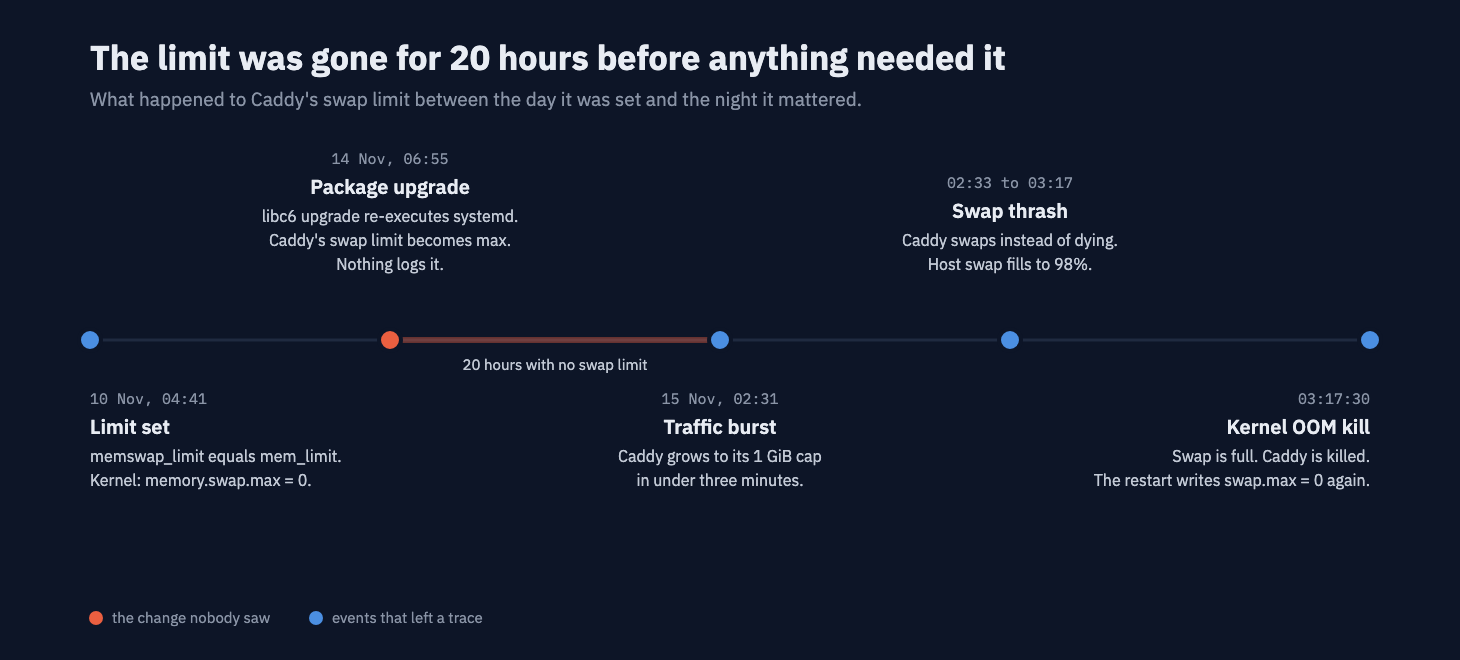
Less than 20 hours passed between the silent change and the night it mattered.
If my theory was right, the re-exec was the moment the limit disappeared. But why would systemd touch a container's memory settings at all?
The accomplice: a zero that does not count
On a modern Linux host, Docker does not create cgroups by hand. The chain is Docker, then containerd, then runc. With the systemd cgroup driver (the default on most current distributions), runc asks systemd to create a small unit for each container, a scope named docker-<id>.scope, and passes the resource limits to systemd as unit properties: MemoryMax, MemorySwapMax and so on.
systemd then owns that unit. It keeps its own record of the unit's properties, and when it re-executes, it applies them to the cgroup again. That is how systemd makes sure the kernel matches its configuration.
So the question became: what did systemd think Caddy's swap limit was? The answer is in runc's systemd driver, in the code that turns Docker's limits into unit properties (opencontainers/cgroups, systemd/v2.go):
if swap != 0
In this code, zero means "not set". When the swap allowance is 0, runc does not send MemorySwapMax to systemd at all. It still writes memory.swap.max = 0 into the cgroup file directly, which is why my check after the deploy looked perfect. But systemd never heard about it.
Why 0 is special
A container with 256 MiB of swap gets
MemorySwapMax=268435456in systemd, and that value survives a re-exec. A container with 0 swap gets nothing in systemd, so after a re-exec systemd applies its default for a property nobody set: no limit. So the only setting that means "never swap" is also the only one systemd forgets.
The proof
I could not replay the re-exec of 14 November, but the theory leaves evidence on the host today: systemd's record of each container. I compared it with the kernel file on the live host, after Caddy's restart had written the 0 again:
| Container | Compose setting | systemd MemorySwapMax | Kernel memory.swap.max |
|---|---|---|---|
| Caddy | swap equal to memory (no swap) | infinity | 0 |
| Marketing site | 256 MiB of swap | 268435456 | 268435456 |
The site container, with a non-zero swap allowance, matches in both places. Caddy does not. The kernel says 0 because the restart just wrote it. systemd says infinity, and the next re-exec would write that back. So the limit would disappear again at the next libc or systemd update.
One page of swap
The fix follows from the code. systemd does not record a zero, so I stopped using zero and gave the container the smallest non-zero swap allowance there is: one page, 4096 bytes.
mem_limit: 1g
memswap_limit: 1073745920   # 1 GiB + 4096 bytes: one page of swap
One page is too small to matter. Caddy cannot hide gigabytes in 4 KiB of swap. When it reaches its cap, the kernel kills it, exactly as the cage was meant to do.
Before deploying, I checked that Docker turns this value into a one page limit:
After the deploy, I checked both places on the host. This time systemd has its own copy of the value:
kernel:  memory.swap.max = 4096
systemd: MemorySwapMax=4096
I did not re-execute systemd on the production host to test it. A re-exec applies the value systemd has on record, and that value is now 4096.
The two-minute test
Check your own host
If you run Docker with the systemd cgroup driver on cgroup v2 (
docker infoshowsCgroup Driver: systemdandCgroup Version: 2), this loop prints each container's swap limit as the kernel sees it and as systemd remembers it:for; do name= file="/sys/fs/cgroup/system.slice/docker-.scope/memory.swap.max" [ || continue doneA line with
kernel=0 systemd=infinityis a container whose no-swap limit will disappear at the next systemd re-exec. A line withkernel=maxmeans it already has.
What I took from this
The limit was in the compose file, in Docker's config and in the kernel, and I checked the kernel right after the deploy. It still failed, because the kernel file was only a copy. The record that counts after a re-exec is systemd's, and systemd's record said "no limit".
Key takeaways
- With the systemd cgroup driver, a container's limits live in two places: the cgroup files and systemd's unit record. A re-exec makes the second one win.
- runc does not register a swap allowance of 0 with systemd. A systemd re-exec then resets
memory.swap.maxtomax.- A libc or systemd package upgrade is enough to trigger the re-exec. On hosts with unattended upgrades, that can happen any night.
- One page of swap (
memswap_limit= memory + 4096 bytes) keeps the limit effectively at zero, and systemd remembers it.- Check limits where they are enforced and where they are stored. Checking only the kernel file right after a deploy is not enough.
The security update, the re-exec and the zero each did what they were designed to do. Together they removed the limit without a single log line, less than a day before I needed it.
Common questions
Does a Docker container with memory-swap equal to memory keep its no-swap limit after systemd re-executes?
Not with the systemd cgroup driver on cgroup v2, in the setup I checked. runc writes memory.swap.max = 0 into the cgroup file, but it only tells systemd about a swap limit that is not zero. When systemd re-executes, it applies the settings it knows about, and the swap limit becomes max.
How do I see a container's real swap limit?
Read the kernel file and ask systemd. The file is /sys/fs/cgroup/system.slice/docker-ID.scope/memory.swap.max, where ID is the full container ID. The systemd value comes from systemctl show docker-ID.scope -p MemorySwapMax. If the file says 0 and systemd says infinity, the limit will not survive the next re-exec.
How do I stop a Docker container from swapping in a way that survives systemd re-exec?
Set the swap allowance to one page instead of zero. For a 1 GiB cap that is memswap_limit: 1073745920, which is 1 GiB plus 4096 bytes. runc then registers MemorySwapMax=4096 with systemd, and the limit survives. One page of swap is too small to matter.
What does limit 9007199254740988kB mean in an OOM report?
It is the largest value the kernel's page counter can hold, printed in kilobytes. The kernel uses it to mean that there is no limit.